What’s new
An overview of the newest Consio phone features, AI Voice Agent enhancements, UI refinements, and bug fixes.
What’s new
An overview of the newest Consio phone features, AI Voice Agent enhancements, UI refinements, and bug fixes.
What’s new
An overview of the newest Consio phone features, AI Voice Agent enhancements, UI refinements, and bug fixes.
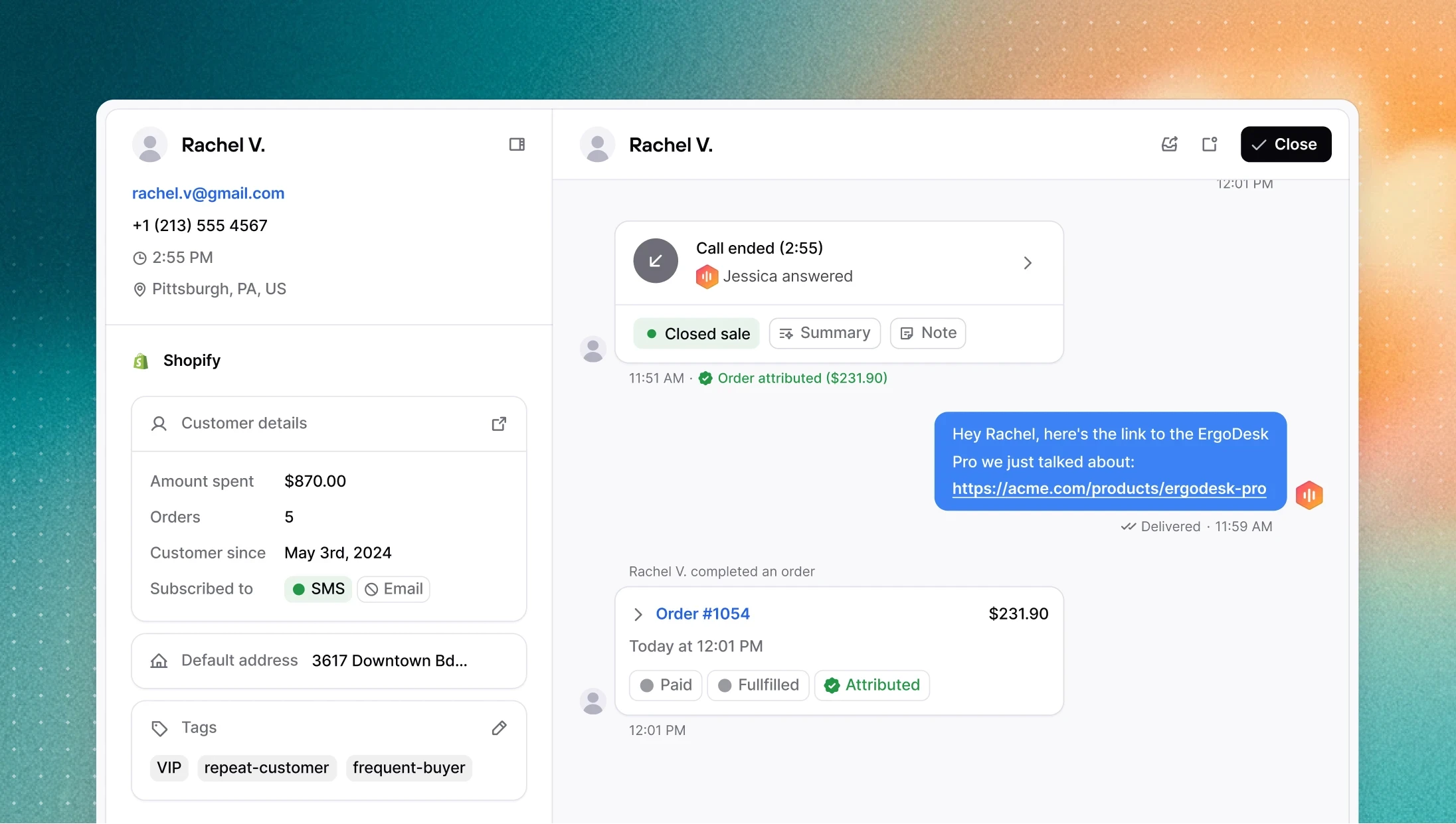
When a customer asks about a product, your AI agent can now text them its exact link (including the specific variant) while the call is live. Previously, agents could send tracking links but didn't always have access to accurate product URLs. That's now fixed, along with improved instructions for how the AI searches the catalog, so it handles edge cases (like empty search results) more reliably.
→ Enable SMS sending in your agent's configuration page
Contacts can now have multiple phone numbers
Consio now supports multiple phone numbers (and email addresses) per contact. Customer records pulled from Shopify and other integrations are matched and merged more accurately, and search across the contact list works across all numbers, not just the primary one.
Other improvements
Audio preview: you can now play and preview voice clips and music directly from the picker before selecting one.
SMS follow-up after dropping a voicemail: the dialer no longer jumps to the next contact automatically after dropping a voicemail, giving you time to send a follow-up SMS first.
Phone number in call details: the phone number associated with an agent is now visible in the call details.
Agent tools UI: updated labels and layout in the agent tools configuration screen.
Notification warning on Windows: if OS-level notifications are blocking browser alerts, a warning now appears in settings with instructions to fix it.
When a customer asks about a product, your AI agent can now text them its exact link (including the specific variant) while the call is live. Previously, agents could send tracking links but didn't always have access to accurate product URLs. That's now fixed, along with improved instructions for how the AI searches the catalog, so it handles edge cases (like empty search results) more reliably.
→ Enable SMS sending in your agent's configuration page
Contacts can now have multiple phone numbers
Consio now supports multiple phone numbers (and email addresses) per contact. Customer records pulled from Shopify and other integrations are matched and merged more accurately, and search across the contact list works across all numbers, not just the primary one.
Other improvements
Audio preview: you can now play and preview voice clips and music directly from the picker before selecting one.
SMS follow-up after dropping a voicemail: the dialer no longer jumps to the next contact automatically after dropping a voicemail, giving you time to send a follow-up SMS first.
Phone number in call details: the phone number associated with an agent is now visible in the call details.
Agent tools UI: updated labels and layout in the agent tools configuration screen.
Notification warning on Windows: if OS-level notifications are blocking browser alerts, a warning now appears in settings with instructions to fix it.
When a customer asks about a product, your AI agent can now text them its exact link (including the specific variant) while the call is live. Previously, agents could send tracking links but didn't always have access to accurate product URLs. That's now fixed, along with improved instructions for how the AI searches the catalog, so it handles edge cases (like empty search results) more reliably.
→ Enable SMS sending in your agent's configuration page
Contacts can now have multiple phone numbers
Consio now supports multiple phone numbers (and email addresses) per contact. Customer records pulled from Shopify and other integrations are matched and merged more accurately, and search across the contact list works across all numbers, not just the primary one.
Other improvements
Audio preview: you can now play and preview voice clips and music directly from the picker before selecting one.
SMS follow-up after dropping a voicemail: the dialer no longer jumps to the next contact automatically after dropping a voicemail, giving you time to send a follow-up SMS first.
Phone number in call details: the phone number associated with an agent is now visible in the call details.
Agent tools UI: updated labels and layout in the agent tools configuration screen.
Notification warning on Windows: if OS-level notifications are blocking browser alerts, a warning now appears in settings with instructions to fix it.
When a customer asks about a product, your AI agent can now text them its exact link (including the specific variant) while the call is live. Previously, agents could send tracking links but didn't always have access to accurate product URLs. That's now fixed, along with improved instructions for how the AI searches the catalog, so it handles edge cases (like empty search results) more reliably.
→ Enable SMS sending in your agent's configuration page
Contacts can now have multiple phone numbers
Consio now supports multiple phone numbers (and email addresses) per contact. Customer records pulled from Shopify and other integrations are matched and merged more accurately, and search across the contact list works across all numbers, not just the primary one.
Other improvements
Audio preview: you can now play and preview voice clips and music directly from the picker before selecting one.
SMS follow-up after dropping a voicemail: the dialer no longer jumps to the next contact automatically after dropping a voicemail, giving you time to send a follow-up SMS first.
Phone number in call details: the phone number associated with an agent is now visible in the call details.
Agent tools UI: updated labels and layout in the agent tools configuration screen.
Notification warning on Windows: if OS-level notifications are blocking browser alerts, a warning now appears in settings with instructions to fix it.
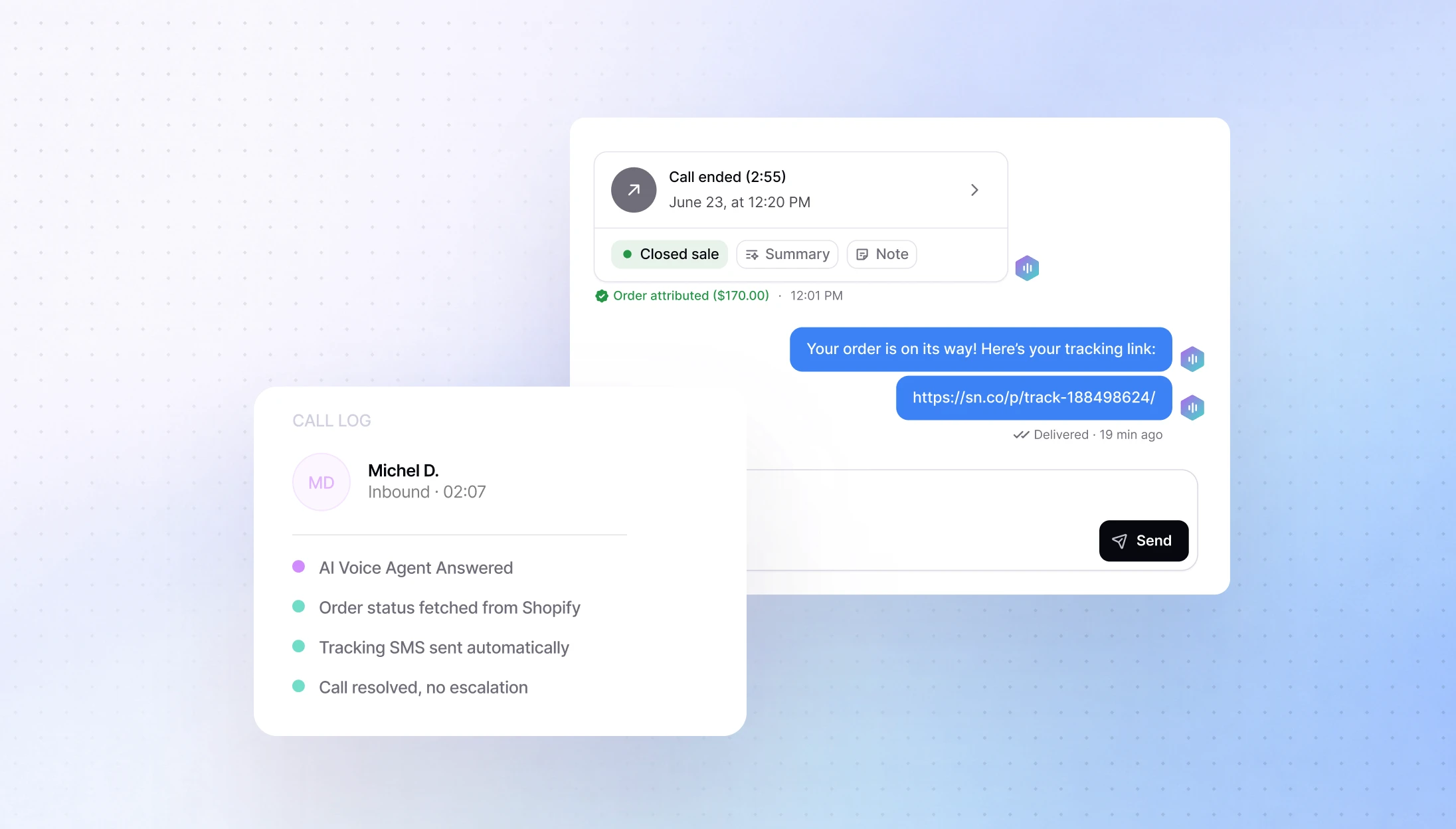
Your AI Voice Agent can now send a tracking link directly to a customer via SMS while the call is still live. When a customer asks where their order is, the AI resolves the inquiry and immediately texts them their tracking link; no handoff needed.
→ Enable it in your agent's tools configuration
AI Voice Agent have just got smarter
We pushed a significant update to how AI agents reason and act during calls. Here's what changed:
Faster, more accurate product search: AI agents can now find your products much more reliably. Search works across product names and descriptions, so the AI surfaces the right item even when a customer uses different wording. Results are faster and more consistent.
Sales situations: the AI is more active in supporting conversions rather than just answering questions.
Call transfers at the wrong time: the AI no longer offers to transfer a call outside business hours.
Fewer wrong answers: overall reduction in hallucinations, especially around links and product information.
Transparency before acting: the AI now tells the customer before triggering a transfer or sending an SMS, so nothing happens without warning.
All agents are updated automatically.
Call routing improvements
Several fixes to make calls reach the right place more reliably:
Outbound call transfers: your agents can now transfer an outbound call just like an inbound one.
Queued calls: agents who just came online are now correctly assigned calls that were waiting in the queue.
Unavailable agents: callers are now sent to fallback immediately instead of waiting for agents marked as unavailable.
Other improvements
Better transcripts: transcripts are now more accurate and easier to read, with context cues like [laughs] to capture the tone of a conversation.
Refreshed onboarding: the sign-up and login flow has been updated with a cleaner design, working correctly in both light and dark mode.
Multi-currency support: Consio now automatically syncs with your Shopify store’s main currency. Revenue amounts display with the correct currency symbol. Existing workspaces just need to reconnect Shopify to update.
Your AI Voice Agent can now send a tracking link directly to a customer via SMS while the call is still live. When a customer asks where their order is, the AI resolves the inquiry and immediately texts them their tracking link; no handoff needed.
→ Enable it in your agent's tools configuration
AI Voice Agent have just got smarter
We pushed a significant update to how AI agents reason and act during calls. Here's what changed:
Faster, more accurate product search: AI agents can now find your products much more reliably. Search works across product names and descriptions, so the AI surfaces the right item even when a customer uses different wording. Results are faster and more consistent.
Sales situations: the AI is more active in supporting conversions rather than just answering questions.
Call transfers at the wrong time: the AI no longer offers to transfer a call outside business hours.
Fewer wrong answers: overall reduction in hallucinations, especially around links and product information.
Transparency before acting: the AI now tells the customer before triggering a transfer or sending an SMS, so nothing happens without warning.
All agents are updated automatically.
Call routing improvements
Several fixes to make calls reach the right place more reliably:
Outbound call transfers: your agents can now transfer an outbound call just like an inbound one.
Queued calls: agents who just came online are now correctly assigned calls that were waiting in the queue.
Unavailable agents: callers are now sent to fallback immediately instead of waiting for agents marked as unavailable.
Other improvements
Better transcripts: transcripts are now more accurate and easier to read, with context cues like [laughs] to capture the tone of a conversation.
Refreshed onboarding: the sign-up and login flow has been updated with a cleaner design, working correctly in both light and dark mode.
Multi-currency support: Consio now automatically syncs with your Shopify store’s main currency. Revenue amounts display with the correct currency symbol. Existing workspaces just need to reconnect Shopify to update.
Your AI Voice Agent can now send a tracking link directly to a customer via SMS while the call is still live. When a customer asks where their order is, the AI resolves the inquiry and immediately texts them their tracking link; no handoff needed.
→ Enable it in your agent's tools configuration
AI Voice Agent have just got smarter
We pushed a significant update to how AI agents reason and act during calls. Here's what changed:
Faster, more accurate product search: AI agents can now find your products much more reliably. Search works across product names and descriptions, so the AI surfaces the right item even when a customer uses different wording. Results are faster and more consistent.
Sales situations: the AI is more active in supporting conversions rather than just answering questions.
Call transfers at the wrong time: the AI no longer offers to transfer a call outside business hours.
Fewer wrong answers: overall reduction in hallucinations, especially around links and product information.
Transparency before acting: the AI now tells the customer before triggering a transfer or sending an SMS, so nothing happens without warning.
All agents are updated automatically.
Call routing improvements
Several fixes to make calls reach the right place more reliably:
Outbound call transfers: your agents can now transfer an outbound call just like an inbound one.
Queued calls: agents who just came online are now correctly assigned calls that were waiting in the queue.
Unavailable agents: callers are now sent to fallback immediately instead of waiting for agents marked as unavailable.
Other improvements
Better transcripts: transcripts are now more accurate and easier to read, with context cues like [laughs] to capture the tone of a conversation.
Refreshed onboarding: the sign-up and login flow has been updated with a cleaner design, working correctly in both light and dark mode.
Multi-currency support: Consio now automatically syncs with your Shopify store’s main currency. Revenue amounts display with the correct currency symbol. Existing workspaces just need to reconnect Shopify to update.
Your AI Voice Agent can now send a tracking link directly to a customer via SMS while the call is still live. When a customer asks where their order is, the AI resolves the inquiry and immediately texts them their tracking link; no handoff needed.
→ Enable it in your agent's tools configuration
AI Voice Agent have just got smarter
We pushed a significant update to how AI agents reason and act during calls. Here's what changed:
Faster, more accurate product search: AI agents can now find your products much more reliably. Search works across product names and descriptions, so the AI surfaces the right item even when a customer uses different wording. Results are faster and more consistent.
Sales situations: the AI is more active in supporting conversions rather than just answering questions.
Call transfers at the wrong time: the AI no longer offers to transfer a call outside business hours.
Fewer wrong answers: overall reduction in hallucinations, especially around links and product information.
Transparency before acting: the AI now tells the customer before triggering a transfer or sending an SMS, so nothing happens without warning.
All agents are updated automatically.
Call routing improvements
Several fixes to make calls reach the right place more reliably:
Outbound call transfers: your agents can now transfer an outbound call just like an inbound one.
Queued calls: agents who just came online are now correctly assigned calls that were waiting in the queue.
Unavailable agents: callers are now sent to fallback immediately instead of waiting for agents marked as unavailable.
Other improvements
Better transcripts: transcripts are now more accurate and easier to read, with context cues like [laughs] to capture the tone of a conversation.
Refreshed onboarding: the sign-up and login flow has been updated with a cleaner design, working correctly in both light and dark mode.
Multi-currency support: Consio now automatically syncs with your Shopify store’s main currency. Revenue amounts display with the correct currency symbol. Existing workspaces just need to reconnect Shopify to update.
We've got great news to share: Consio is now integrated with Zendesk.
The goal of this integration is simple: bring your calls into Zendesk tickets, where your team already works, to save time and keep full context across every customer interaction.
What you're getting, starting today
Automatic ticket creation: every completed call in Consio creates a Zendesk ticket (inbound or outbound)
Ticket updates:
when the customer is identified/linked in Zendesk,
when the call’s AI summary is generated (posted as an internal note: “Call was summarized on Consio.”),
when the call is logged (posted as an internal note: “Call was logged on Consio.” with disposition + notes),
the call details are posted as an internal note: “A new call was completed on Consio” (customer, agent, duration, direction, phone number),
Zendesk → Consio link: open the full call record in Consio in one click if you need to dig deeper.
Why it’s useful
Everything in one place: calls now live in Zendesk alongside your other support tickets, so agents stay in one workspace.
Less friction: your team sees the full call context (details + disposition/notes + AI summary) directly inside the ticket.
More action: with AI summaries in Zendesk, agents know exactly what to do next without re-listening to calls.
We've got great news to share: Consio is now integrated with Zendesk.
The goal of this integration is simple: bring your calls into Zendesk tickets, where your team already works, to save time and keep full context across every customer interaction.
What you're getting, starting today
Automatic ticket creation: every completed call in Consio creates a Zendesk ticket (inbound or outbound)
Ticket updates:
when the customer is identified/linked in Zendesk,
when the call’s AI summary is generated (posted as an internal note: “Call was summarized on Consio.”),
when the call is logged (posted as an internal note: “Call was logged on Consio.” with disposition + notes),
the call details are posted as an internal note: “A new call was completed on Consio” (customer, agent, duration, direction, phone number),
Zendesk → Consio link: open the full call record in Consio in one click if you need to dig deeper.
Why it’s useful
Everything in one place: calls now live in Zendesk alongside your other support tickets, so agents stay in one workspace.
Less friction: your team sees the full call context (details + disposition/notes + AI summary) directly inside the ticket.
More action: with AI summaries in Zendesk, agents know exactly what to do next without re-listening to calls.
We've got great news to share: Consio is now integrated with Zendesk.
The goal of this integration is simple: bring your calls into Zendesk tickets, where your team already works, to save time and keep full context across every customer interaction.
What you're getting, starting today
Automatic ticket creation: every completed call in Consio creates a Zendesk ticket (inbound or outbound)
Ticket updates:
when the customer is identified/linked in Zendesk,
when the call’s AI summary is generated (posted as an internal note: “Call was summarized on Consio.”),
when the call is logged (posted as an internal note: “Call was logged on Consio.” with disposition + notes),
the call details are posted as an internal note: “A new call was completed on Consio” (customer, agent, duration, direction, phone number),
Zendesk → Consio link: open the full call record in Consio in one click if you need to dig deeper.
Why it’s useful
Everything in one place: calls now live in Zendesk alongside your other support tickets, so agents stay in one workspace.
Less friction: your team sees the full call context (details + disposition/notes + AI summary) directly inside the ticket.
More action: with AI summaries in Zendesk, agents know exactly what to do next without re-listening to calls.
We've got great news to share: Consio is now integrated with Zendesk.
The goal of this integration is simple: bring your calls into Zendesk tickets, where your team already works, to save time and keep full context across every customer interaction.
What you're getting, starting today
Automatic ticket creation: every completed call in Consio creates a Zendesk ticket (inbound or outbound)
Ticket updates:
when the customer is identified/linked in Zendesk,
when the call’s AI summary is generated (posted as an internal note: “Call was summarized on Consio.”),
when the call is logged (posted as an internal note: “Call was logged on Consio.” with disposition + notes),
the call details are posted as an internal note: “A new call was completed on Consio” (customer, agent, duration, direction, phone number),
Zendesk → Consio link: open the full call record in Consio in one click if you need to dig deeper.
Why it’s useful
Everything in one place: calls now live in Zendesk alongside your other support tickets, so agents stay in one workspace.
Less friction: your team sees the full call context (details + disposition/notes + AI summary) directly inside the ticket.
More action: with AI summaries in Zendesk, agents know exactly what to do next without re-listening to calls.
Live Monitoring
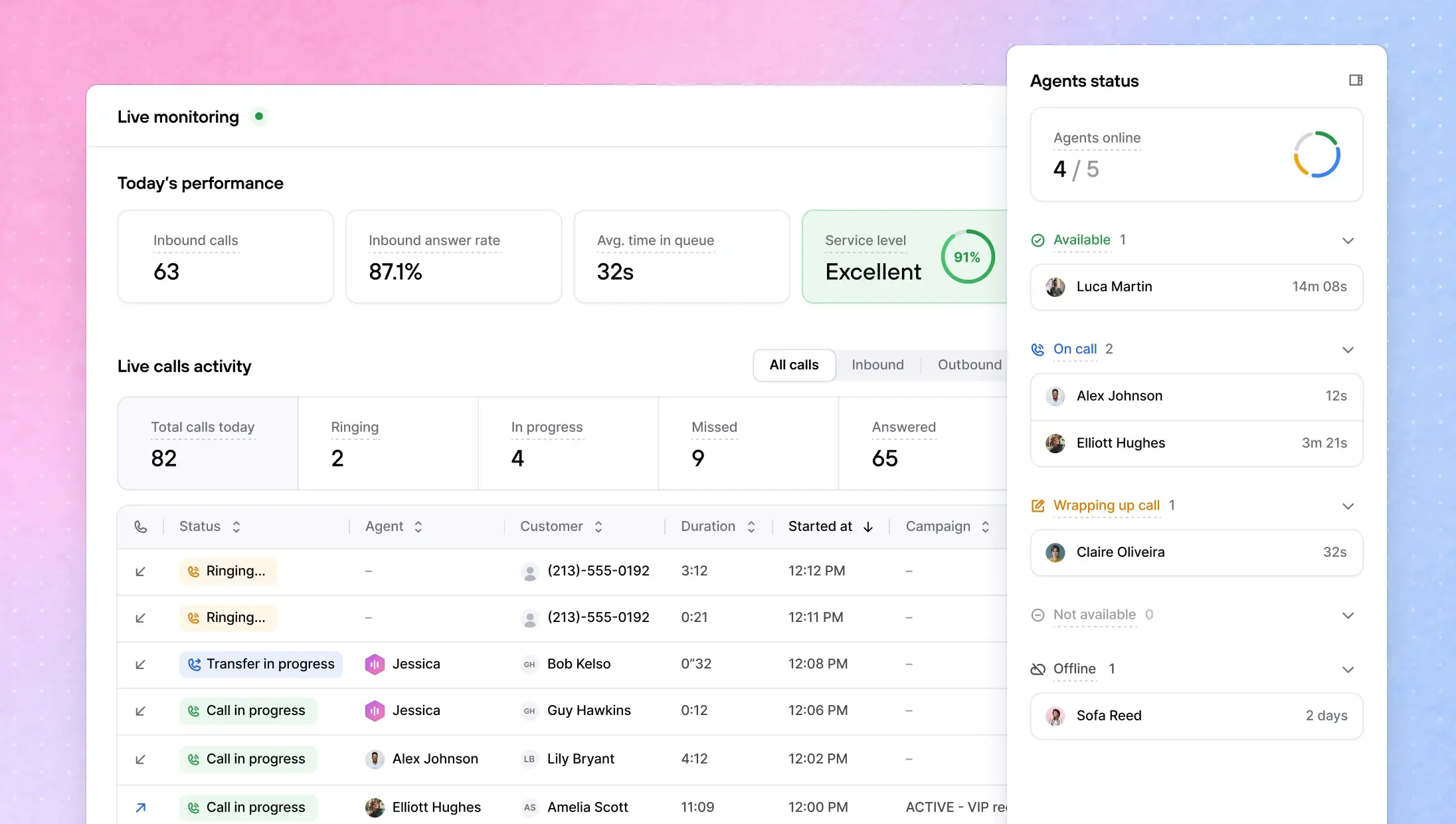
You can now monitor your call center in real time. The new Live Monitoring page gives you a live view of all calls happening today, with key metrics at a glance and a table ordered by most recent activity. Duration updates in real time so you always know what's in progress.
Go to: Consio → Live Monitoring
AI Dialer Assistant
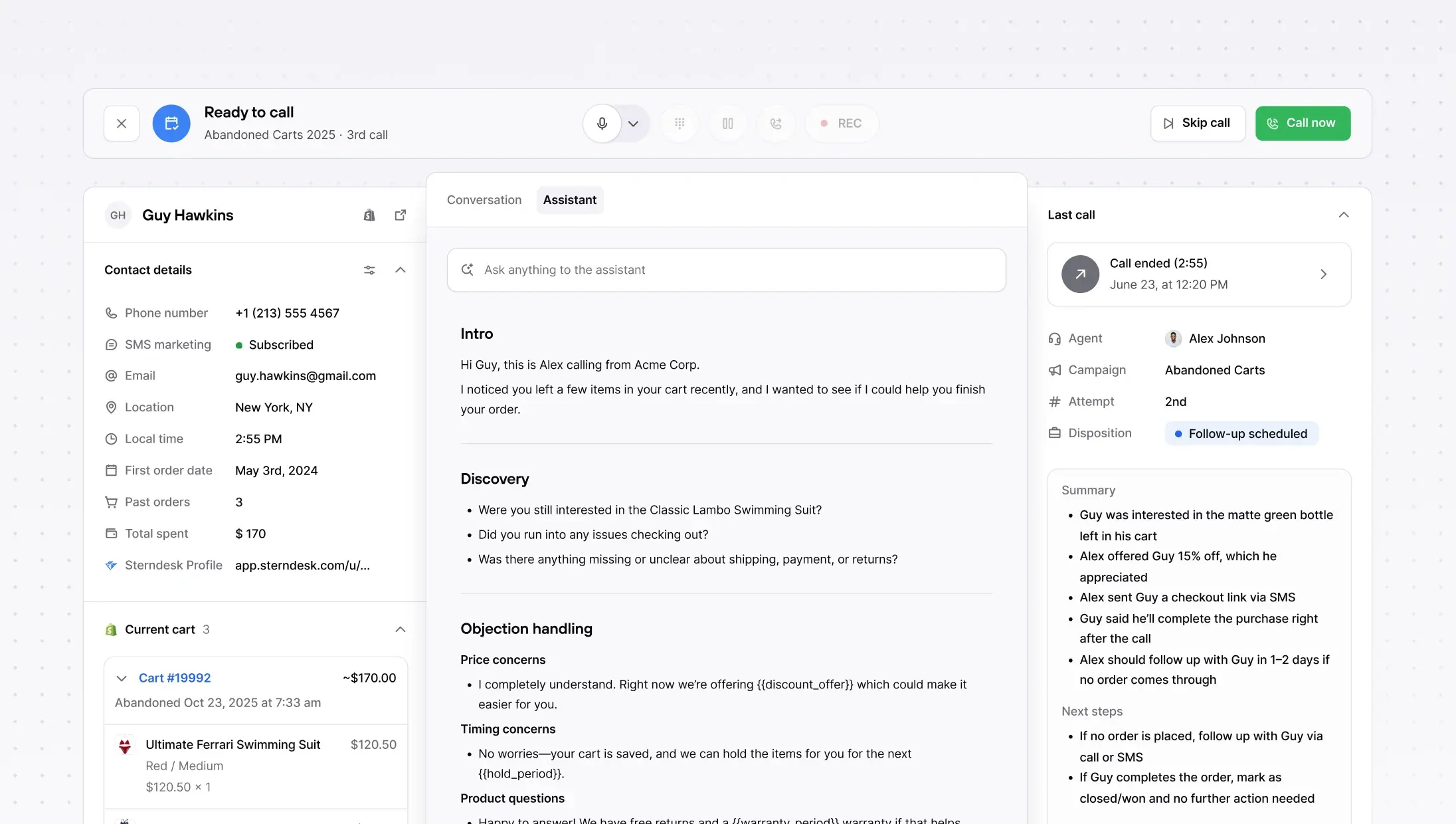
We have just launched the AI Dialer Assistant, a smart companion that helps human agents during calls. It surfaces the right campaign script at the right moment, helps agents stay on-track with what to say next, and makes it easy to follow a consistent pitch without tab-switching.
Campaign Scripts now replace Cue Cards as a simple, editable script document to guide outbound calls, easy to maintain, easy to use live.
AI Voice Agents: much richer customer context + safer prompting
Two upgrades to how your AI Voice Agents handle calls:
More context, better answers. AI Agents now have access to a customer's full order history and previous call history, not just the most recent order. Most calls are order inquiries, and your AI can now handle them end to end with the full picture.
Safer, more reliable prompting. We've migrated to system prompt overrides, which means your agents' instructions are passed more reliably on every call. This fixes edge cases where dynamic variables caused calls to fail silently.
Block inbound calls + SMS (new blocklist)
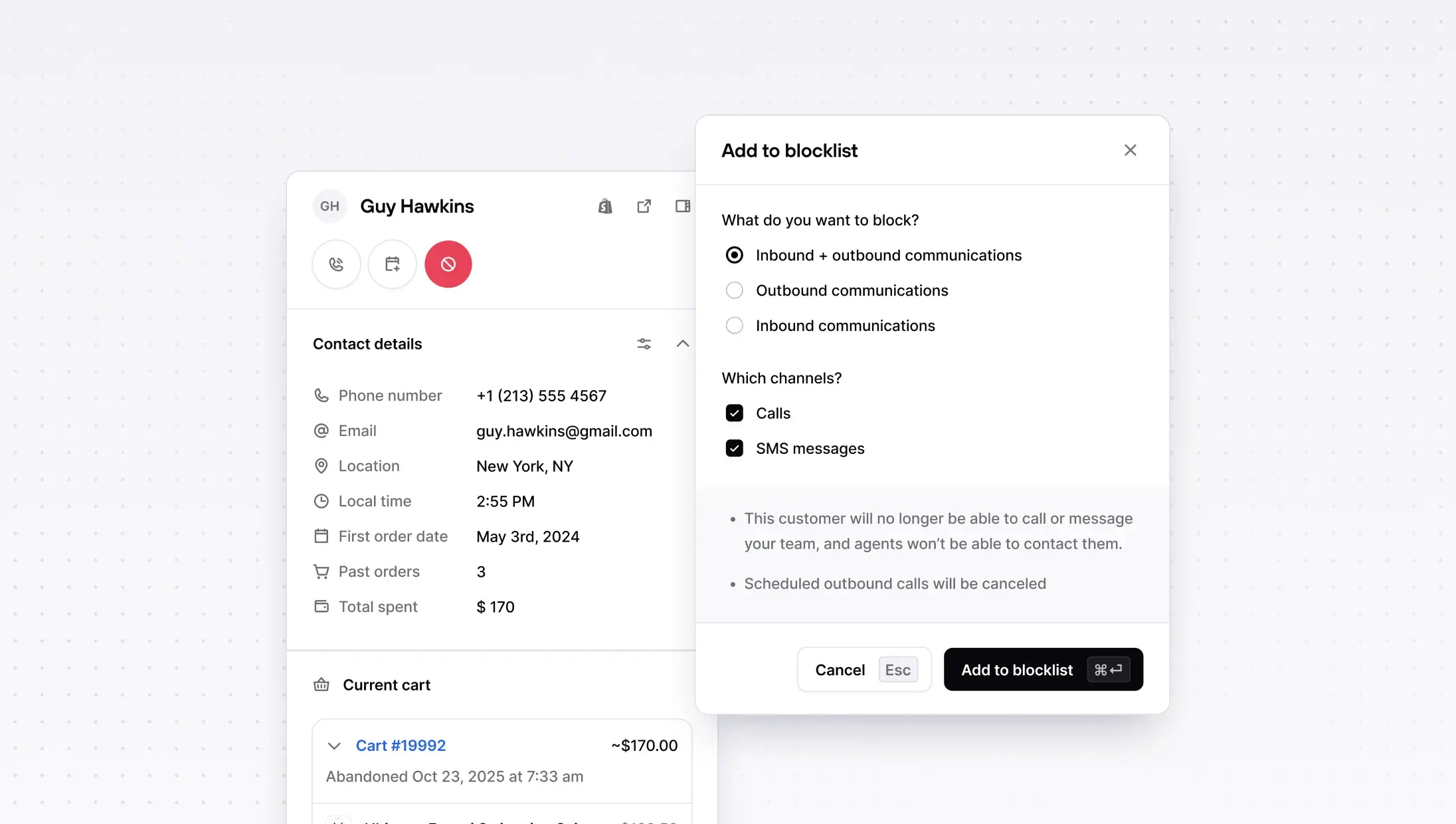
We've replaced the DNC list with a unified Blocklist that works across all directions and channels. You can now block a customer for inbound calls, outbound calls, or both, and the same applies to SMS. One place to manage all blocking, no confusion about what's covered.
Other improvements
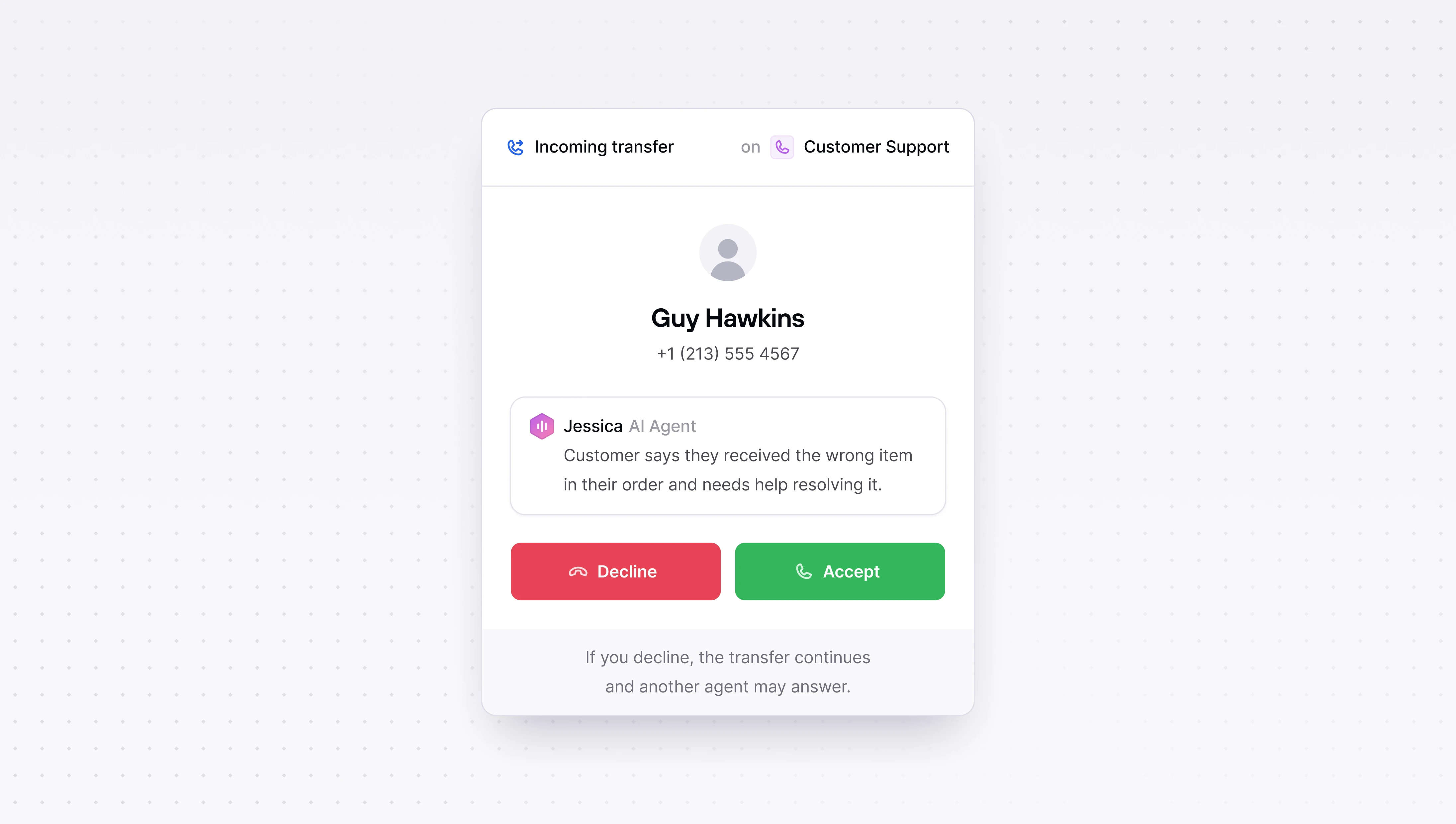
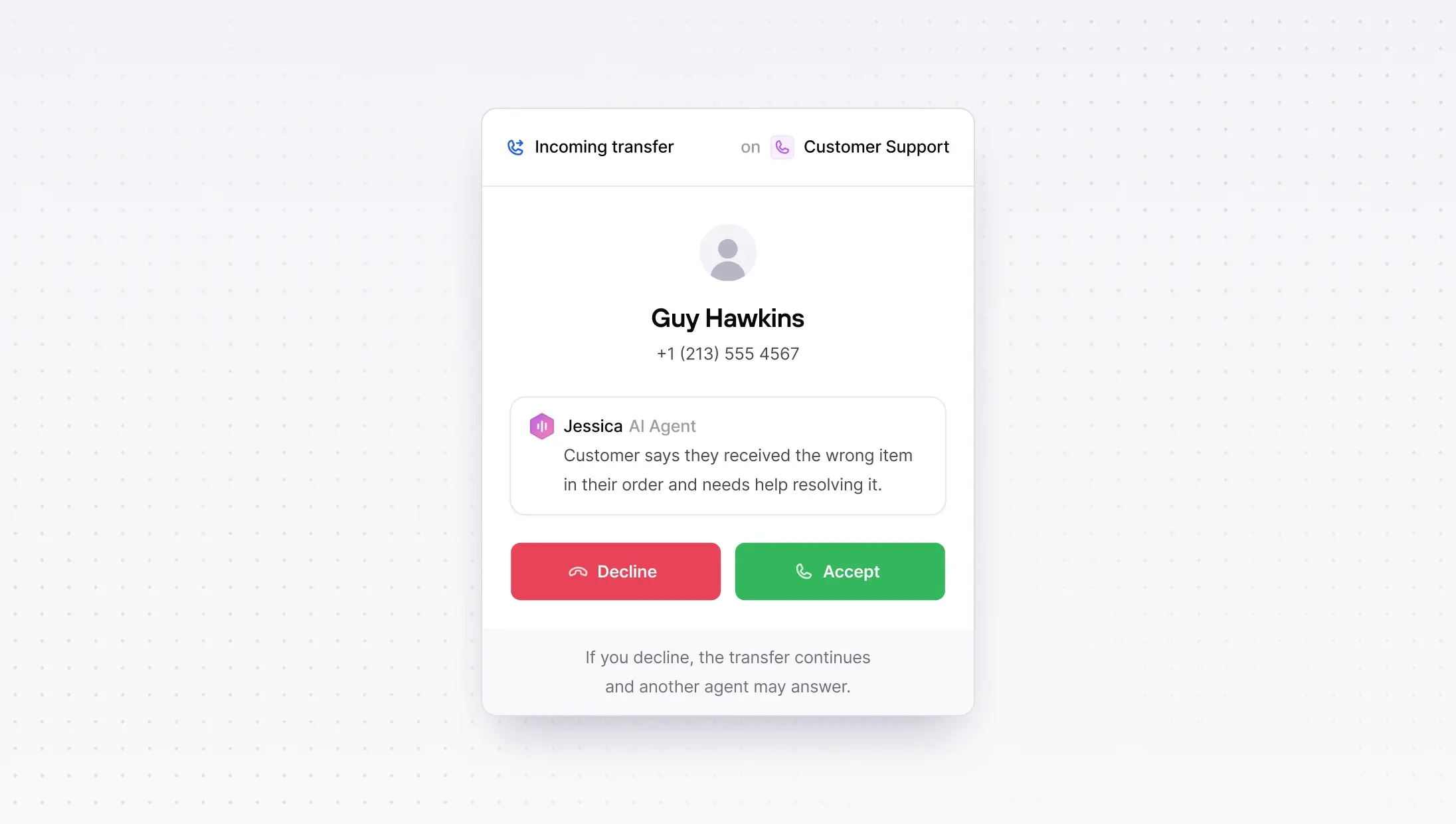
AI can now transfer to external numbers, route callers to any phone number, not just Consio-registered agents. Great for multi-location setups.
Customer auto-merging, duplicate profiles caused by mismatched phone numbers or emails are now automatically merged when Shopify webhooks confirm the correct contact info.
Campaign script improvements, AI-generated scripts, unsaved changes warnings, loading skeletons, and duplicating a campaign now copies its script.
Inbox improvements, hover actions on inbox items (move, close, mark as read) directly from the sidebar.
Calls & transfers, better call transfer UX, support for both call and voicemail recordings on the same call, and external transfers now show the customer's caller ID.
Live Monitoring
You can now monitor your call center in real time. The new Live Monitoring page gives you a live view of all calls happening today, with key metrics at a glance and a table ordered by most recent activity. Duration updates in real time so you always know what's in progress.
Go to: Consio → Live Monitoring
AI Dialer Assistant
We have just launched the AI Dialer Assistant, a smart companion that helps human agents during calls. It surfaces the right campaign script at the right moment, helps agents stay on-track with what to say next, and makes it easy to follow a consistent pitch without tab-switching.
Campaign Scripts now replace Cue Cards as a simple, editable script document to guide outbound calls, easy to maintain, easy to use live.
AI Voice Agents: much richer customer context + safer prompting
Two upgrades to how your AI Voice Agents handle calls:
More context, better answers. AI Agents now have access to a customer's full order history and previous call history, not just the most recent order. Most calls are order inquiries, and your AI can now handle them end to end with the full picture.
Safer, more reliable prompting. We've migrated to system prompt overrides, which means your agents' instructions are passed more reliably on every call. This fixes edge cases where dynamic variables caused calls to fail silently.
Block inbound calls + SMS (new blocklist)
We've replaced the DNC list with a unified Blocklist that works across all directions and channels. You can now block a customer for inbound calls, outbound calls, or both, and the same applies to SMS. One place to manage all blocking, no confusion about what's covered.
Other improvements
AI can now transfer to external numbers, route callers to any phone number, not just Consio-registered agents. Great for multi-location setups.
Customer auto-merging, duplicate profiles caused by mismatched phone numbers or emails are now automatically merged when Shopify webhooks confirm the correct contact info.
Campaign script improvements, AI-generated scripts, unsaved changes warnings, loading skeletons, and duplicating a campaign now copies its script.
Inbox improvements, hover actions on inbox items (move, close, mark as read) directly from the sidebar.
Calls & transfers, better call transfer UX, support for both call and voicemail recordings on the same call, and external transfers now show the customer's caller ID.
Live Monitoring
You can now monitor your call center in real time. The new Live Monitoring page gives you a live view of all calls happening today, with key metrics at a glance and a table ordered by most recent activity. Duration updates in real time so you always know what's in progress.
Go to: Consio → Live Monitoring
AI Dialer Assistant
We have just launched the AI Dialer Assistant, a smart companion that helps human agents during calls. It surfaces the right campaign script at the right moment, helps agents stay on-track with what to say next, and makes it easy to follow a consistent pitch without tab-switching.
Campaign Scripts now replace Cue Cards as a simple, editable script document to guide outbound calls, easy to maintain, easy to use live.
AI Voice Agents: much richer customer context + safer prompting
Two upgrades to how your AI Voice Agents handle calls:
More context, better answers. AI Agents now have access to a customer's full order history and previous call history, not just the most recent order. Most calls are order inquiries, and your AI can now handle them end to end with the full picture.
Safer, more reliable prompting. We've migrated to system prompt overrides, which means your agents' instructions are passed more reliably on every call. This fixes edge cases where dynamic variables caused calls to fail silently.
Block inbound calls + SMS (new blocklist)
We've replaced the DNC list with a unified Blocklist that works across all directions and channels. You can now block a customer for inbound calls, outbound calls, or both, and the same applies to SMS. One place to manage all blocking, no confusion about what's covered.
Other improvements
AI can now transfer to external numbers, route callers to any phone number, not just Consio-registered agents. Great for multi-location setups.
Customer auto-merging, duplicate profiles caused by mismatched phone numbers or emails are now automatically merged when Shopify webhooks confirm the correct contact info.
Campaign script improvements, AI-generated scripts, unsaved changes warnings, loading skeletons, and duplicating a campaign now copies its script.
Inbox improvements, hover actions on inbox items (move, close, mark as read) directly from the sidebar.
Calls & transfers, better call transfer UX, support for both call and voicemail recordings on the same call, and external transfers now show the customer's caller ID.
Live Monitoring
You can now monitor your call center in real time. The new Live Monitoring page gives you a live view of all calls happening today, with key metrics at a glance and a table ordered by most recent activity. Duration updates in real time so you always know what's in progress.
Go to: Consio → Live Monitoring
AI Dialer Assistant
We have just launched the AI Dialer Assistant, a smart companion that helps human agents during calls. It surfaces the right campaign script at the right moment, helps agents stay on-track with what to say next, and makes it easy to follow a consistent pitch without tab-switching.
Campaign Scripts now replace Cue Cards as a simple, editable script document to guide outbound calls, easy to maintain, easy to use live.
AI Voice Agents: much richer customer context + safer prompting
Two upgrades to how your AI Voice Agents handle calls:
More context, better answers. AI Agents now have access to a customer's full order history and previous call history, not just the most recent order. Most calls are order inquiries, and your AI can now handle them end to end with the full picture.
Safer, more reliable prompting. We've migrated to system prompt overrides, which means your agents' instructions are passed more reliably on every call. This fixes edge cases where dynamic variables caused calls to fail silently.
Block inbound calls + SMS (new blocklist)
We've replaced the DNC list with a unified Blocklist that works across all directions and channels. You can now block a customer for inbound calls, outbound calls, or both, and the same applies to SMS. One place to manage all blocking, no confusion about what's covered.
Other improvements
AI can now transfer to external numbers, route callers to any phone number, not just Consio-registered agents. Great for multi-location setups.
Customer auto-merging, duplicate profiles caused by mismatched phone numbers or emails are now automatically merged when Shopify webhooks confirm the correct contact info.
Campaign script improvements, AI-generated scripts, unsaved changes warnings, loading skeletons, and duplicating a campaign now copies its script.
Inbox improvements, hover actions on inbox items (move, close, mark as read) directly from the sidebar.
Calls & transfers, better call transfer UX, support for both call and voicemail recordings on the same call, and external transfers now show the customer's caller ID.
AI IVR & smart call routing
Inbound calls are too valuable to send to a phone tree.
Consio AI Voice agent for Shopify can now answer instantly, understand what callers want, answer mst of it, and route them automatically to an AI agent, a human agent, the right team, or voicemail.
No “Press 1 for…”. Callers just speak naturally (“order status”, “returns”, “sales”, “VIP”) and Consio handles the rest.
Set call routing options directly from your AI agent, using natural language to determin which path of escalations conversations handed to.
Go to: Consio → Phone numbers → AI IVR & smart call routing
Attributed Orders
If you run phone + SMS, you shouldn’t have to bounce between pages to answer one question: what actually drove revenue?
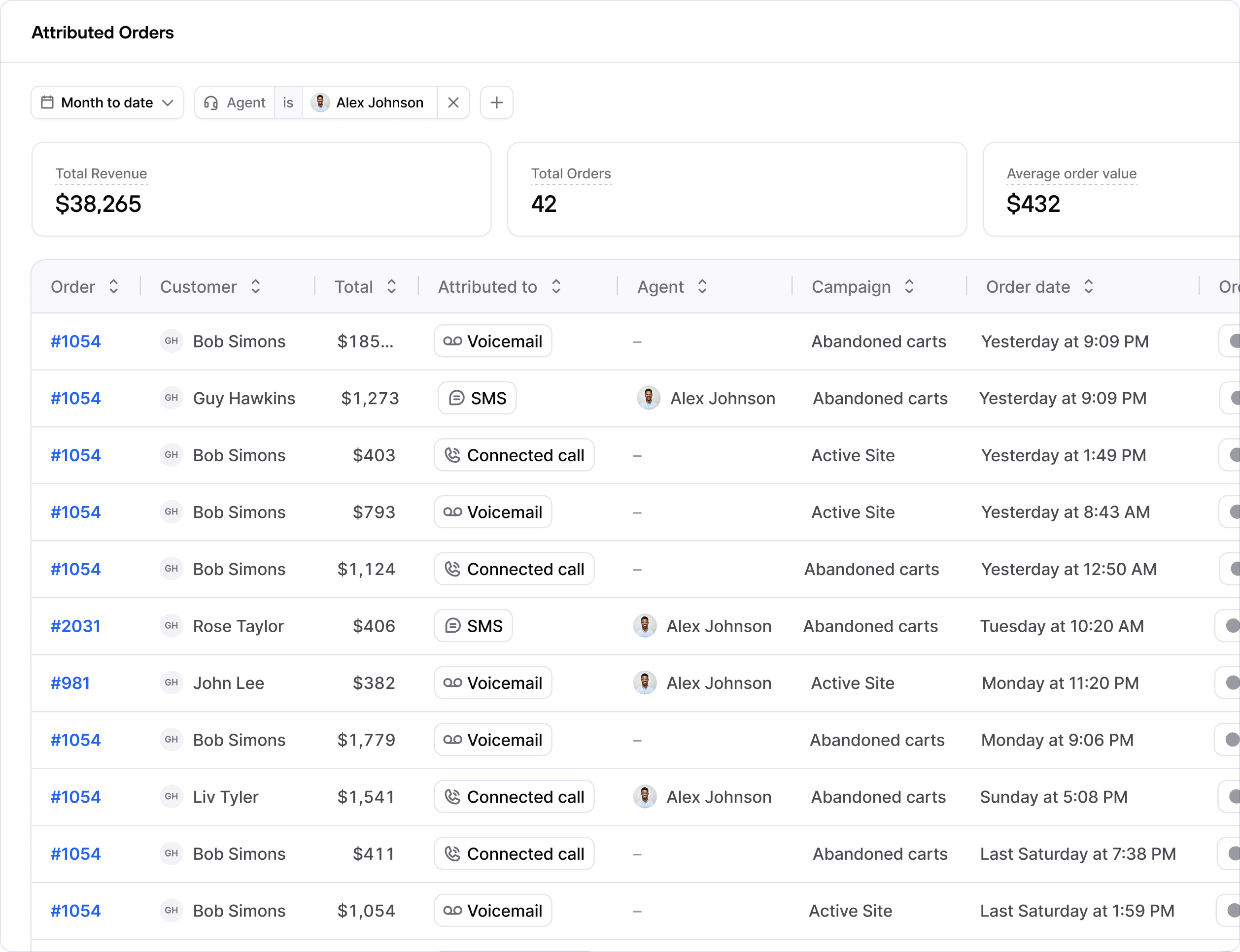
Attributed Orders gives you a clean snapshot for any date range (total revenue, total orders, AOV), then breaks it down order-by-order with the exact touchpoint (Connected call / Voicemail / SMS), plus the agent and campaign behind it.
Click into an order and you’ve got the context in seconds. No more guessing.
Go to: Consio → Attributed orders
Call transfers & smarter inbound routing
Some calls shouldn’t stay with the first person who picks up, and now they don’t have to.
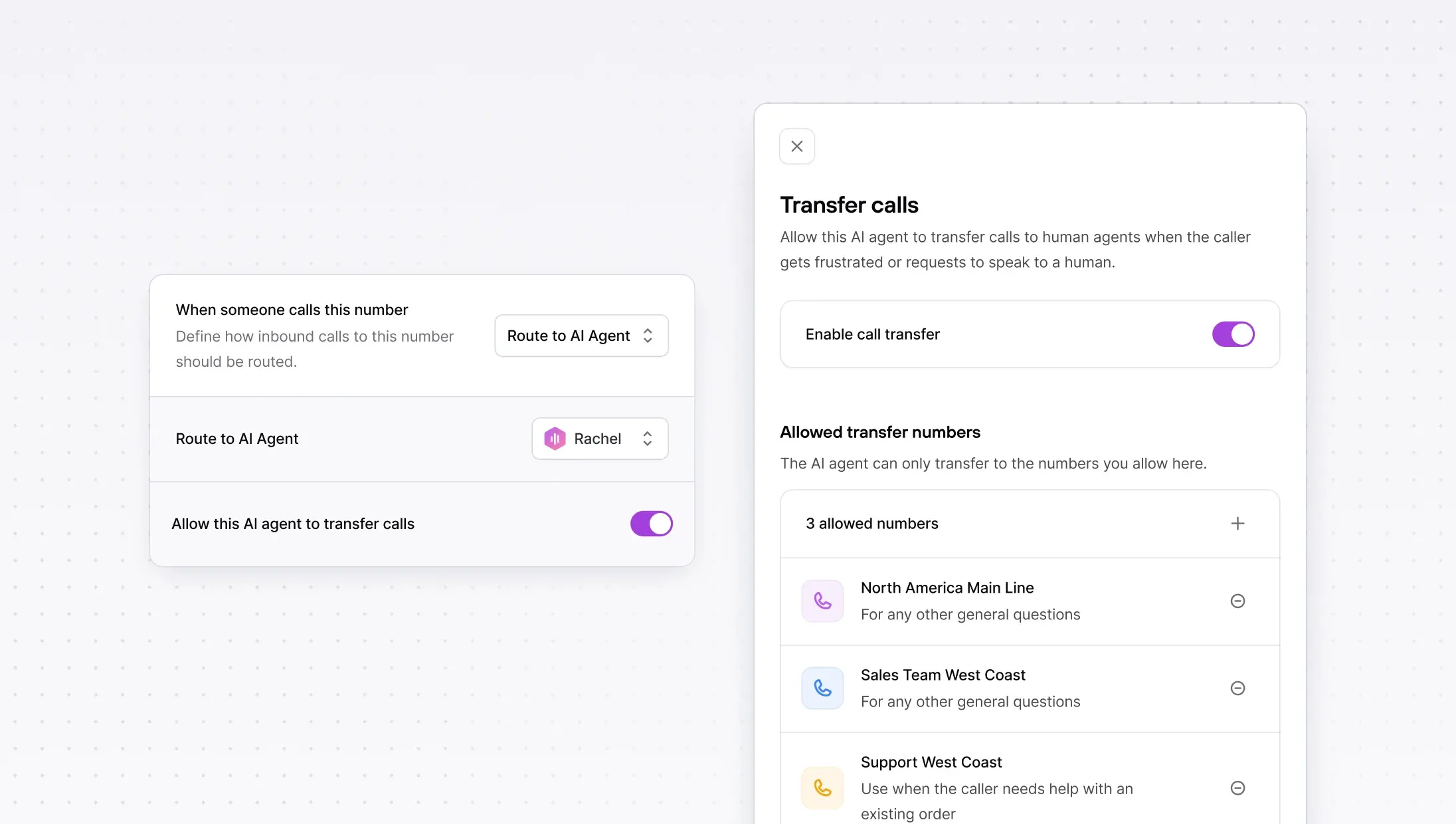
You can now transfer a live customer call to the right teammate, and admins can route inbound calls to a phone number.
Go to: Consio → AI agent → Call transfers
Other improvements
Multiple phone inboxes (Advanced inboxes v0) — a cleaner multi-inbox experience, plus new inbox actions (like bulk actions and quick access to inbox settings) to manage multiple numbers faster.
AI IVR & smart call routing
Inbound calls are too valuable to send to a phone tree.
Consio AI Voice agent for Shopify can now answer instantly, understand what callers want, answer mst of it, and route them automatically to an AI agent, a human agent, the right team, or voicemail.
No “Press 1 for…”. Callers just speak naturally (“order status”, “returns”, “sales”, “VIP”) and Consio handles the rest.
Set call routing options directly from your AI agent, using natural language to determin which path of escalations conversations handed to.
Go to: Consio → Phone numbers → AI IVR & smart call routing
Attributed Orders
If you run phone + SMS, you shouldn’t have to bounce between pages to answer one question: what actually drove revenue?
Attributed Orders gives you a clean snapshot for any date range (total revenue, total orders, AOV), then breaks it down order-by-order with the exact touchpoint (Connected call / Voicemail / SMS), plus the agent and campaign behind it.
Click into an order and you’ve got the context in seconds. No more guessing.
Go to: Consio → Attributed orders
Call transfers & smarter inbound routing
Some calls shouldn’t stay with the first person who picks up, and now they don’t have to.
You can now transfer a live customer call to the right teammate, and admins can route inbound calls to a phone number.
Go to: Consio → AI agent → Call transfers
Other improvements
Multiple phone inboxes (Advanced inboxes v0) — a cleaner multi-inbox experience, plus new inbox actions (like bulk actions and quick access to inbox settings) to manage multiple numbers faster.
AI IVR & smart call routing
Inbound calls are too valuable to send to a phone tree.
Consio AI Voice agent for Shopify can now answer instantly, understand what callers want, answer mst of it, and route them automatically to an AI agent, a human agent, the right team, or voicemail.
No “Press 1 for…”. Callers just speak naturally (“order status”, “returns”, “sales”, “VIP”) and Consio handles the rest.
Set call routing options directly from your AI agent, using natural language to determin which path of escalations conversations handed to.
Go to: Consio → Phone numbers → AI IVR & smart call routing
Attributed Orders
If you run phone + SMS, you shouldn’t have to bounce between pages to answer one question: what actually drove revenue?
Attributed Orders gives you a clean snapshot for any date range (total revenue, total orders, AOV), then breaks it down order-by-order with the exact touchpoint (Connected call / Voicemail / SMS), plus the agent and campaign behind it.
Click into an order and you’ve got the context in seconds. No more guessing.
Go to: Consio → Attributed orders
Call transfers & smarter inbound routing
Some calls shouldn’t stay with the first person who picks up, and now they don’t have to.
You can now transfer a live customer call to the right teammate, and admins can route inbound calls to a phone number.
Go to: Consio → AI agent → Call transfers
Other improvements
Multiple phone inboxes (Advanced inboxes v0) — a cleaner multi-inbox experience, plus new inbox actions (like bulk actions and quick access to inbox settings) to manage multiple numbers faster.
AI IVR & smart call routing
Inbound calls are too valuable to send to a phone tree.
Consio AI Voice agent for Shopify can now answer instantly, understand what callers want, answer mst of it, and route them automatically to an AI agent, a human agent, the right team, or voicemail.
No “Press 1 for…”. Callers just speak naturally (“order status”, “returns”, “sales”, “VIP”) and Consio handles the rest.
Set call routing options directly from your AI agent, using natural language to determin which path of escalations conversations handed to.
Go to: Consio → Phone numbers → AI IVR & smart call routing
Attributed Orders
If you run phone + SMS, you shouldn’t have to bounce between pages to answer one question: what actually drove revenue?
Attributed Orders gives you a clean snapshot for any date range (total revenue, total orders, AOV), then breaks it down order-by-order with the exact touchpoint (Connected call / Voicemail / SMS), plus the agent and campaign behind it.
Click into an order and you’ve got the context in seconds. No more guessing.
Go to: Consio → Attributed orders
Call transfers & smarter inbound routing
Some calls shouldn’t stay with the first person who picks up, and now they don’t have to.
You can now transfer a live customer call to the right teammate, and admins can route inbound calls to a phone number.
Go to: Consio → AI agent → Call transfers
Other improvements
Multiple phone inboxes (Advanced inboxes v0) — a cleaner multi-inbox experience, plus new inbox actions (like bulk actions and quick access to inbox settings) to manage multiple numbers faster.
We've got great news to share: Consio is now integrated with Richpanel.
The goal of this integration is simple: bring your calls into Richpanel, where your support team already manages customer conversations, to save time and keep full context across every channel.

What you're getting, starting today
Automatic conversation creation: every completed call in Consio creates a Richpanel conversation (inbound or outbound).
Conversation updates:
when the customer is identified/linked in Richpanel,
when the call’s AI summary is generated (added as a conversation message),
for any inbound voicemail, a message is posted in the conversation,
missed call transcripts are available directly in Richpanel.
Richpanel → Consio link: access the full call record in Consio in one click if you need to dig deeper.
Why it’s useful
Everything in one place: calls now live in Richpanel alongside email, chat, social, and messaging conversations—so agents stay in a single workspace.
Less friction: support teams keep the full customer context (order, history, conversations, and now calls) without switching tools.
More action: with AI call summaries directly in Richpanel, agents know exactly what to do next without re-listening to calls.
We've got great news to share: Consio is now integrated with Richpanel.
The goal of this integration is simple: bring your calls into Richpanel, where your support team already manages customer conversations, to save time and keep full context across every channel.
What you're getting, starting today
Automatic conversation creation: every completed call in Consio creates a Richpanel conversation (inbound or outbound).
Conversation updates:
when the customer is identified/linked in Richpanel,
when the call’s AI summary is generated (added as a conversation message),
for any inbound voicemail, a message is posted in the conversation,
missed call transcripts are available directly in Richpanel.
Richpanel → Consio link: access the full call record in Consio in one click if you need to dig deeper.
Why it’s useful
Everything in one place: calls now live in Richpanel alongside email, chat, social, and messaging conversations—so agents stay in a single workspace.
Less friction: support teams keep the full customer context (order, history, conversations, and now calls) without switching tools.
More action: with AI call summaries directly in Richpanel, agents know exactly what to do next without re-listening to calls.
We've got great news to share: Consio is now integrated with Richpanel.
The goal of this integration is simple: bring your calls into Richpanel, where your support team already manages customer conversations, to save time and keep full context across every channel.
What you're getting, starting today
Automatic conversation creation: every completed call in Consio creates a Richpanel conversation (inbound or outbound).
Conversation updates:
when the customer is identified/linked in Richpanel,
when the call’s AI summary is generated (added as a conversation message),
for any inbound voicemail, a message is posted in the conversation,
missed call transcripts are available directly in Richpanel.
Richpanel → Consio link: access the full call record in Consio in one click if you need to dig deeper.
Why it’s useful
Everything in one place: calls now live in Richpanel alongside email, chat, social, and messaging conversations—so agents stay in a single workspace.
Less friction: support teams keep the full customer context (order, history, conversations, and now calls) without switching tools.
More action: with AI call summaries directly in Richpanel, agents know exactly what to do next without re-listening to calls.
We've got great news to share: Consio is now integrated with Richpanel.
The goal of this integration is simple: bring your calls into Richpanel, where your support team already manages customer conversations, to save time and keep full context across every channel.
What you're getting, starting today
Automatic conversation creation: every completed call in Consio creates a Richpanel conversation (inbound or outbound).
Conversation updates:
when the customer is identified/linked in Richpanel,
when the call’s AI summary is generated (added as a conversation message),
for any inbound voicemail, a message is posted in the conversation,
missed call transcripts are available directly in Richpanel.
Richpanel → Consio link: access the full call record in Consio in one click if you need to dig deeper.
Why it’s useful
Everything in one place: calls now live in Richpanel alongside email, chat, social, and messaging conversations—so agents stay in a single workspace.
Less friction: support teams keep the full customer context (order, history, conversations, and now calls) without switching tools.
More action: with AI call summaries directly in Richpanel, agents know exactly what to do next without re-listening to calls.
Knowledge Base: Text & Website sources, powered by RAG
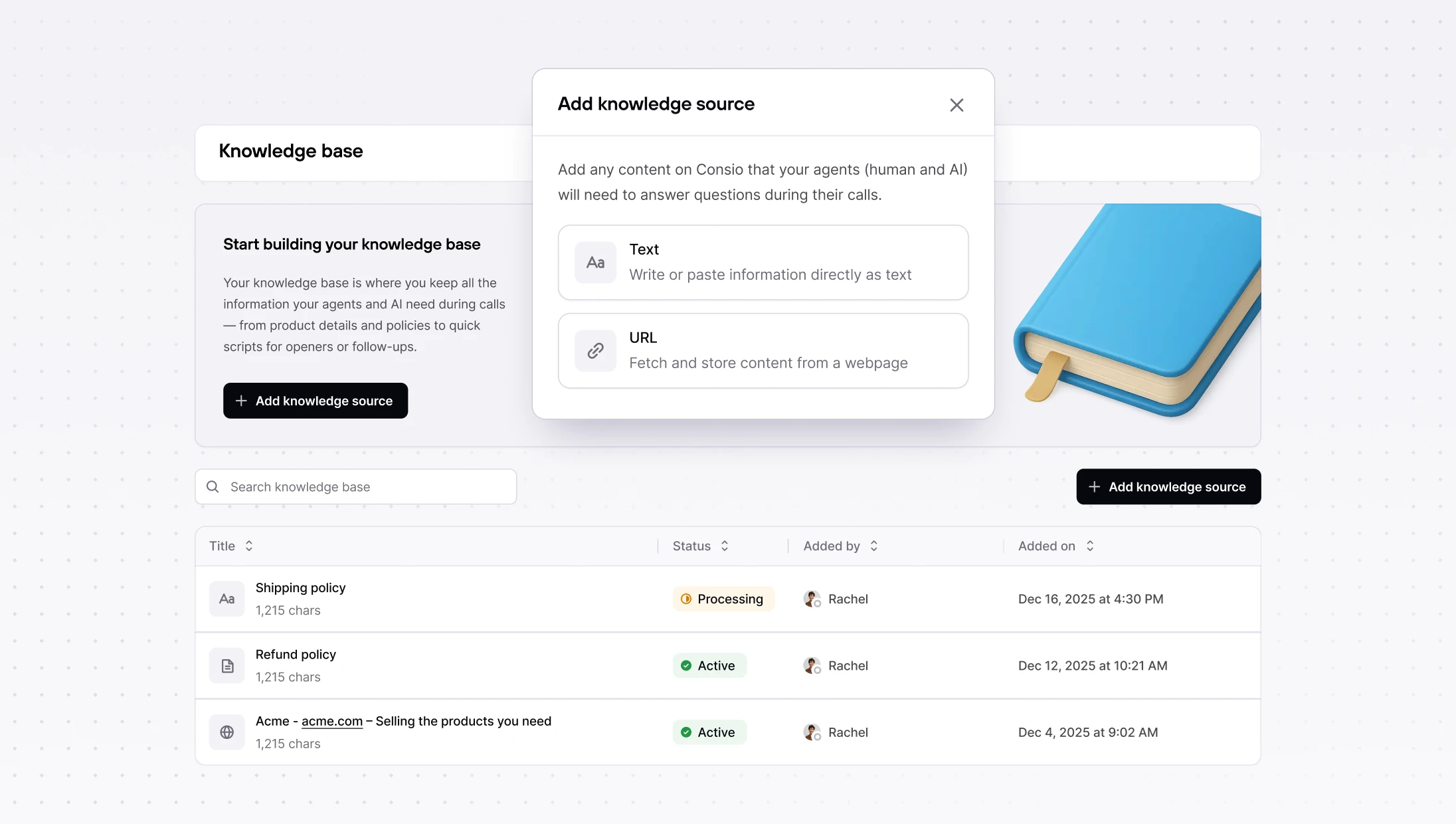
Create knowledge sources from rich-text or a website. Consio cleans and extracts the content and sends it to our RAG system, so your AI agents answer with brand-accurate information.
Tip: add policies, FAQs, shipping & returns, promos, anything your team references.
Go to: Consio → Knowledge Base → Add knowledge source
New Analytics: inbound, outbound & SMS in one place
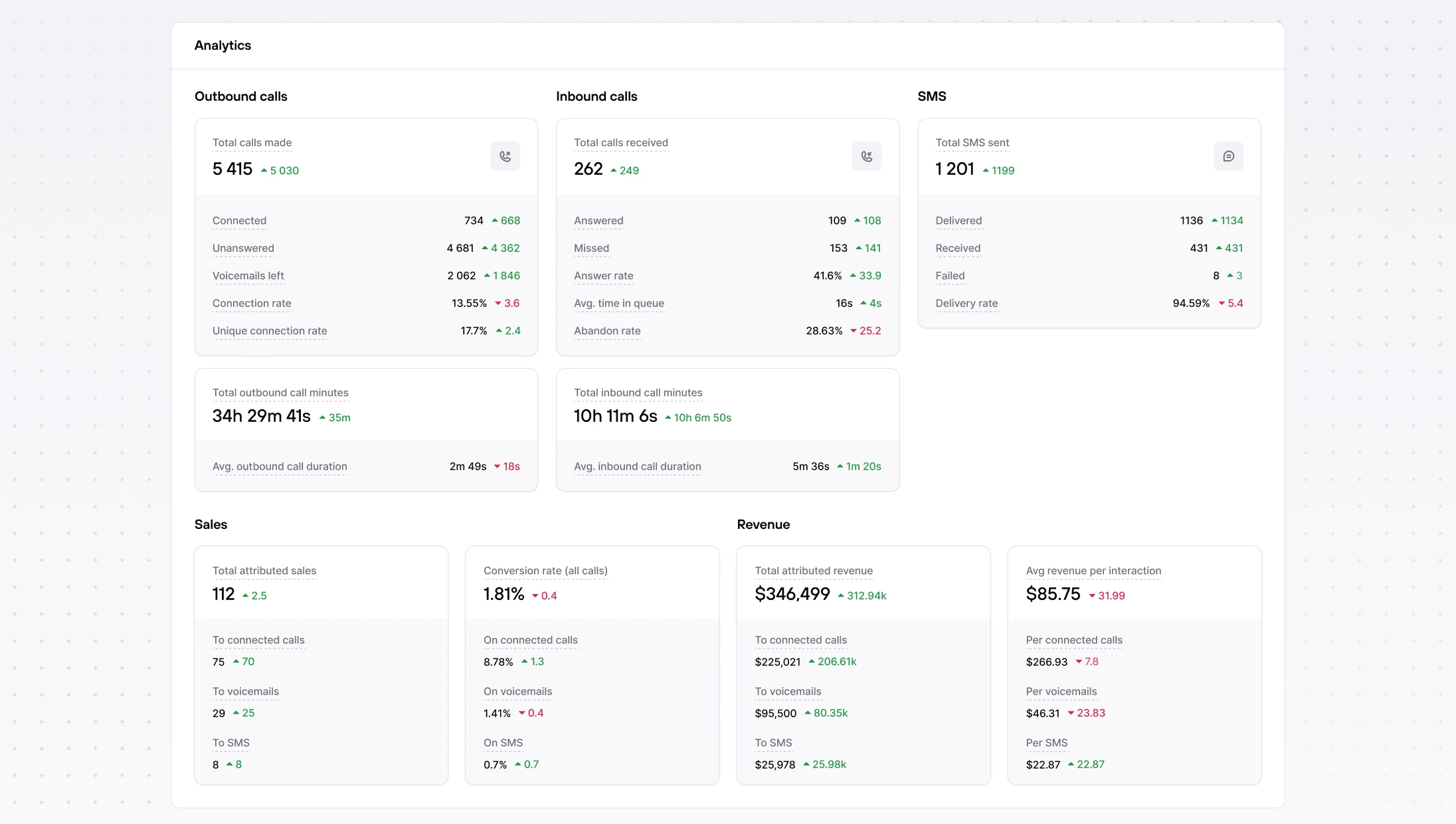
Meet your dedicated Analytics page with clearer metrics: totals, answer/connection/conversion rates, average time in queue for inbound, and SMS volume & conversion. Campaign headers and filters were tightened up for more accurate stats.
Revenue attribution & timeline badges
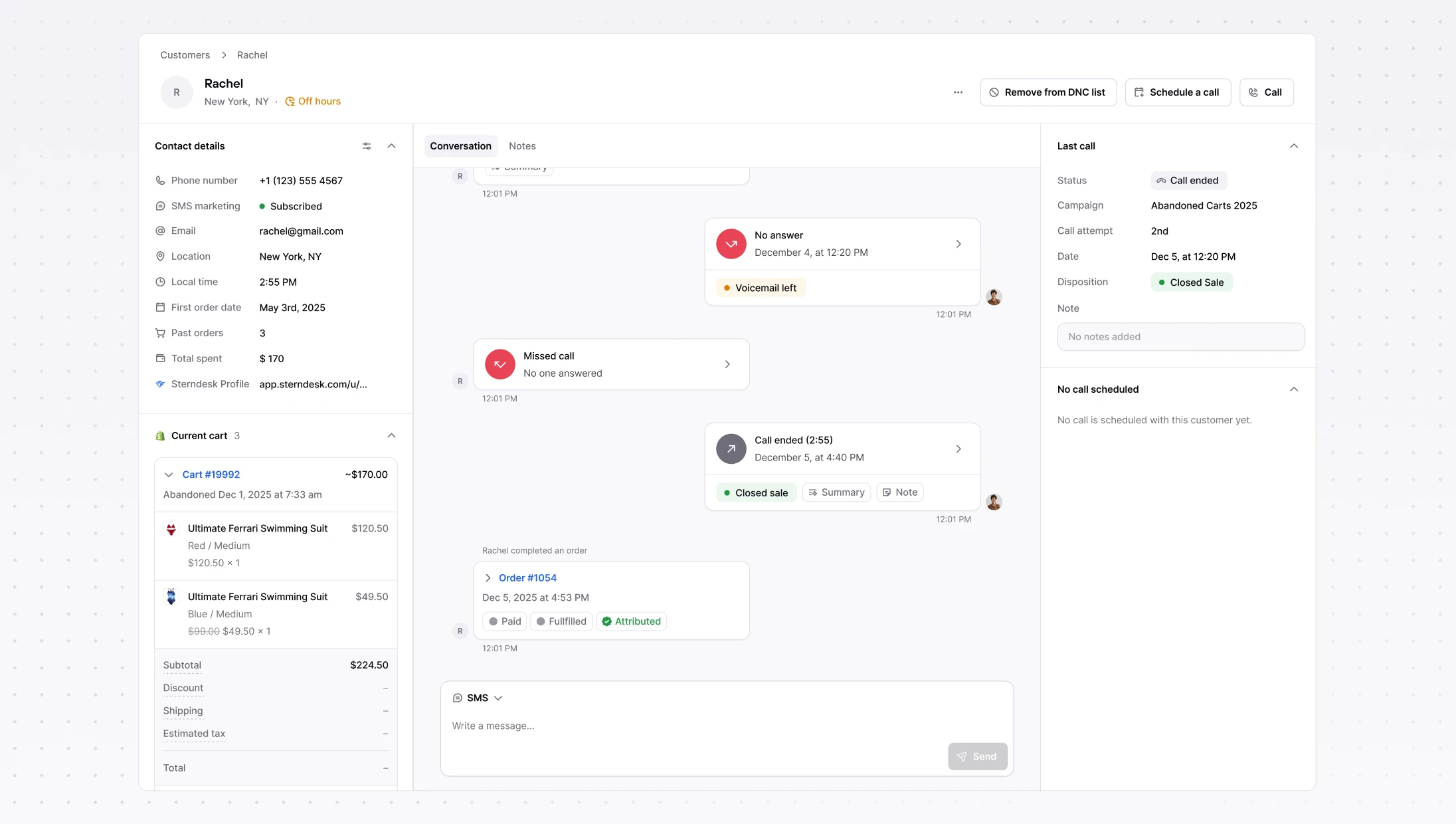
You’ll now see call & SMS attribution details and badges directly in the customer timeline, making it obvious which interactions drove sales and where revenue came from.
Other improvements
Shopify upgrades – Shopify presentment currency and shipping info now show in the customer panel.
Klaviyo upgrades : we display multiple profiles when they exist and create standard segments automatically on connect.
Knowledge Base: Text & Website sources, powered by RAG
Create knowledge sources from rich-text or a website. Consio cleans and extracts the content and sends it to our RAG system, so your AI agents answer with brand-accurate information.
Tip: add policies, FAQs, shipping & returns, promos, anything your team references.
Go to: Consio → Knowledge Base → Add knowledge source
New Analytics: inbound, outbound & SMS in one place
Meet your dedicated Analytics page with clearer metrics: totals, answer/connection/conversion rates, average time in queue for inbound, and SMS volume & conversion. Campaign headers and filters were tightened up for more accurate stats.
Revenue attribution & timeline badges
You’ll now see call & SMS attribution details and badges directly in the customer timeline, making it obvious which interactions drove sales and where revenue came from.
Other improvements
Shopify upgrades – Shopify presentment currency and shipping info now show in the customer panel.
Klaviyo upgrades : we display multiple profiles when they exist and create standard segments automatically on connect.
Knowledge Base: Text & Website sources, powered by RAG
Create knowledge sources from rich-text or a website. Consio cleans and extracts the content and sends it to our RAG system, so your AI agents answer with brand-accurate information.
Tip: add policies, FAQs, shipping & returns, promos, anything your team references.
Go to: Consio → Knowledge Base → Add knowledge source
New Analytics: inbound, outbound & SMS in one place
Meet your dedicated Analytics page with clearer metrics: totals, answer/connection/conversion rates, average time in queue for inbound, and SMS volume & conversion. Campaign headers and filters were tightened up for more accurate stats.
Revenue attribution & timeline badges
You’ll now see call & SMS attribution details and badges directly in the customer timeline, making it obvious which interactions drove sales and where revenue came from.
Other improvements
Shopify upgrades – Shopify presentment currency and shipping info now show in the customer panel.
Klaviyo upgrades : we display multiple profiles when they exist and create standard segments automatically on connect.
Knowledge Base: Text & Website sources, powered by RAG
Create knowledge sources from rich-text or a website. Consio cleans and extracts the content and sends it to our RAG system, so your AI agents answer with brand-accurate information.
Tip: add policies, FAQs, shipping & returns, promos, anything your team references.
Go to: Consio → Knowledge Base → Add knowledge source
New Analytics: inbound, outbound & SMS in one place
Meet your dedicated Analytics page with clearer metrics: totals, answer/connection/conversion rates, average time in queue for inbound, and SMS volume & conversion. Campaign headers and filters were tightened up for more accurate stats.
Revenue attribution & timeline badges
You’ll now see call & SMS attribution details and badges directly in the customer timeline, making it obvious which interactions drove sales and where revenue came from.
Other improvements
Shopify upgrades – Shopify presentment currency and shipping info now show in the customer panel.
Klaviyo upgrades : we display multiple profiles when they exist and create standard segments automatically on connect.
Customer context for AI Voice Agent
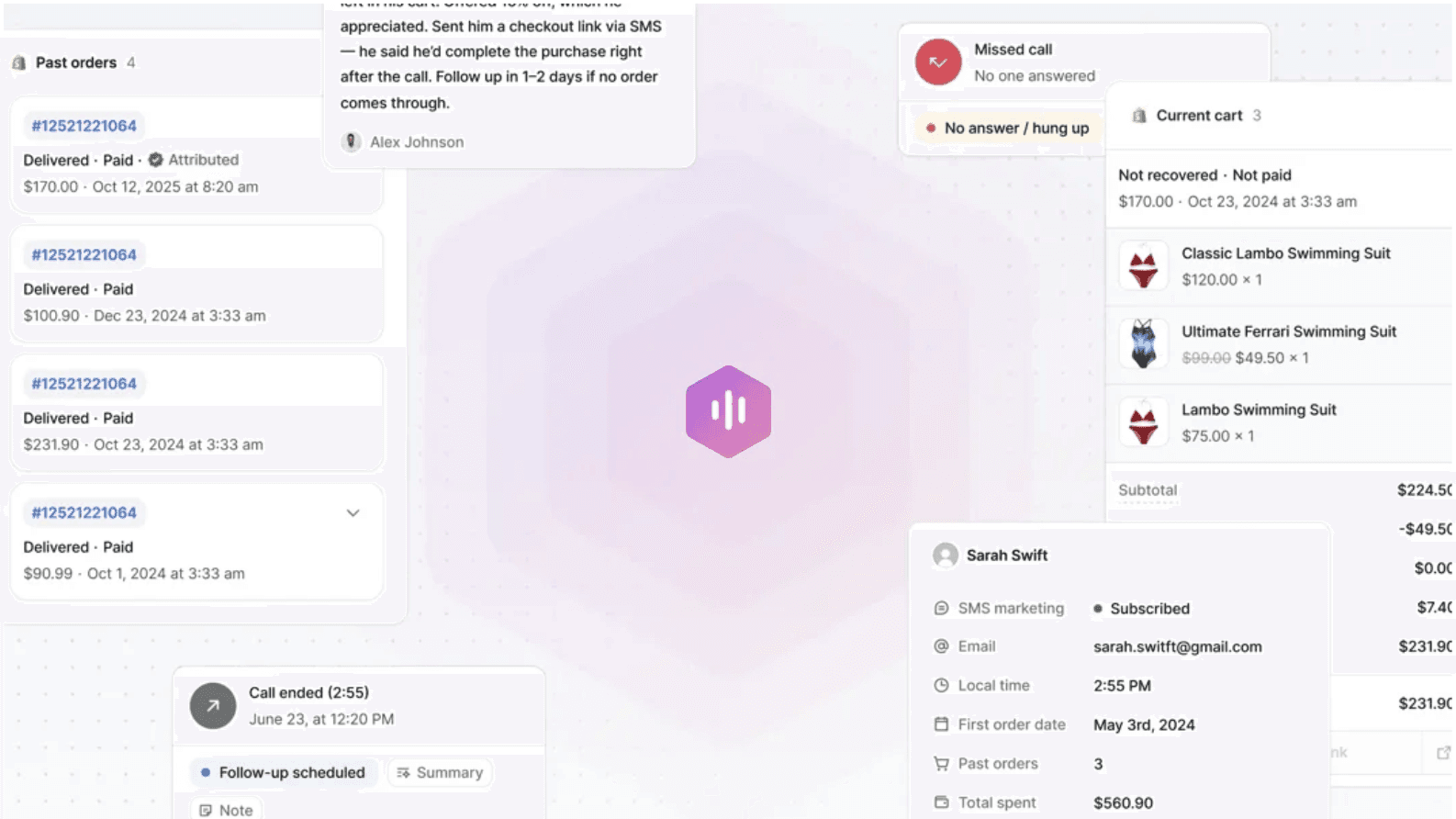
The AI now has full Shopify customer context, including order and shipping and is able to solve full inquiries on it's own. It behaves like a true teammate. The AI agent appears as the agent who took the call and leaves a complete trail in the Inbox. This gives you better visibility into AI-handled calls. Also, you can now run multiple specialized AI agents, for example, one for support and one for sales.
Send and receive SMS in Consio
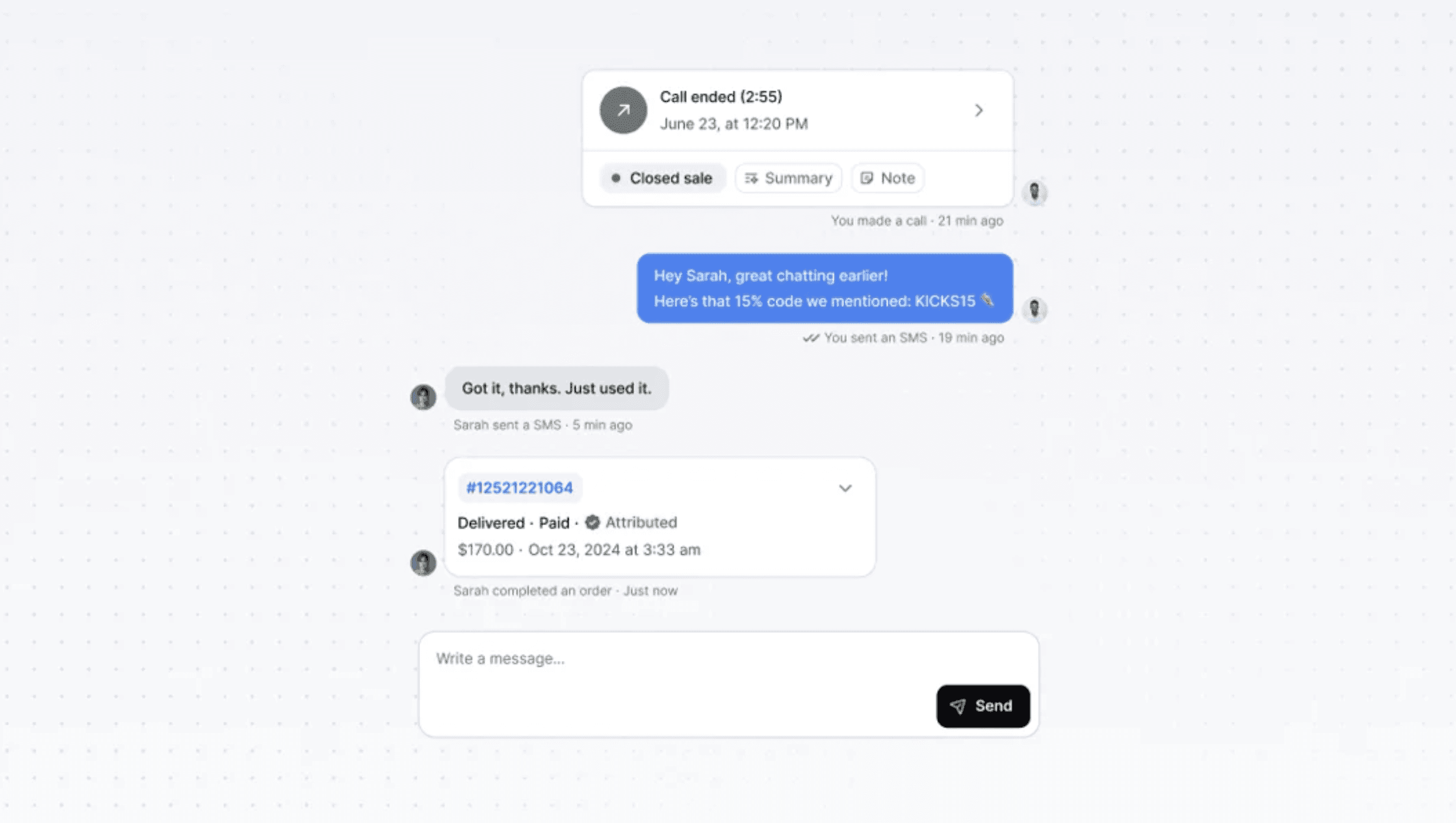
Send and receive SMS right in Consio. Messages appear in the customer timeline and the Inbox, with clear Sent/Delivered states and friendly error handling.
You can use Consio to track all revenue attributed to SMS handled by agents.
Enable SMS → Settings → Trust Center → Register your numbers for SMS
Multiple phone numbers & smarter routing
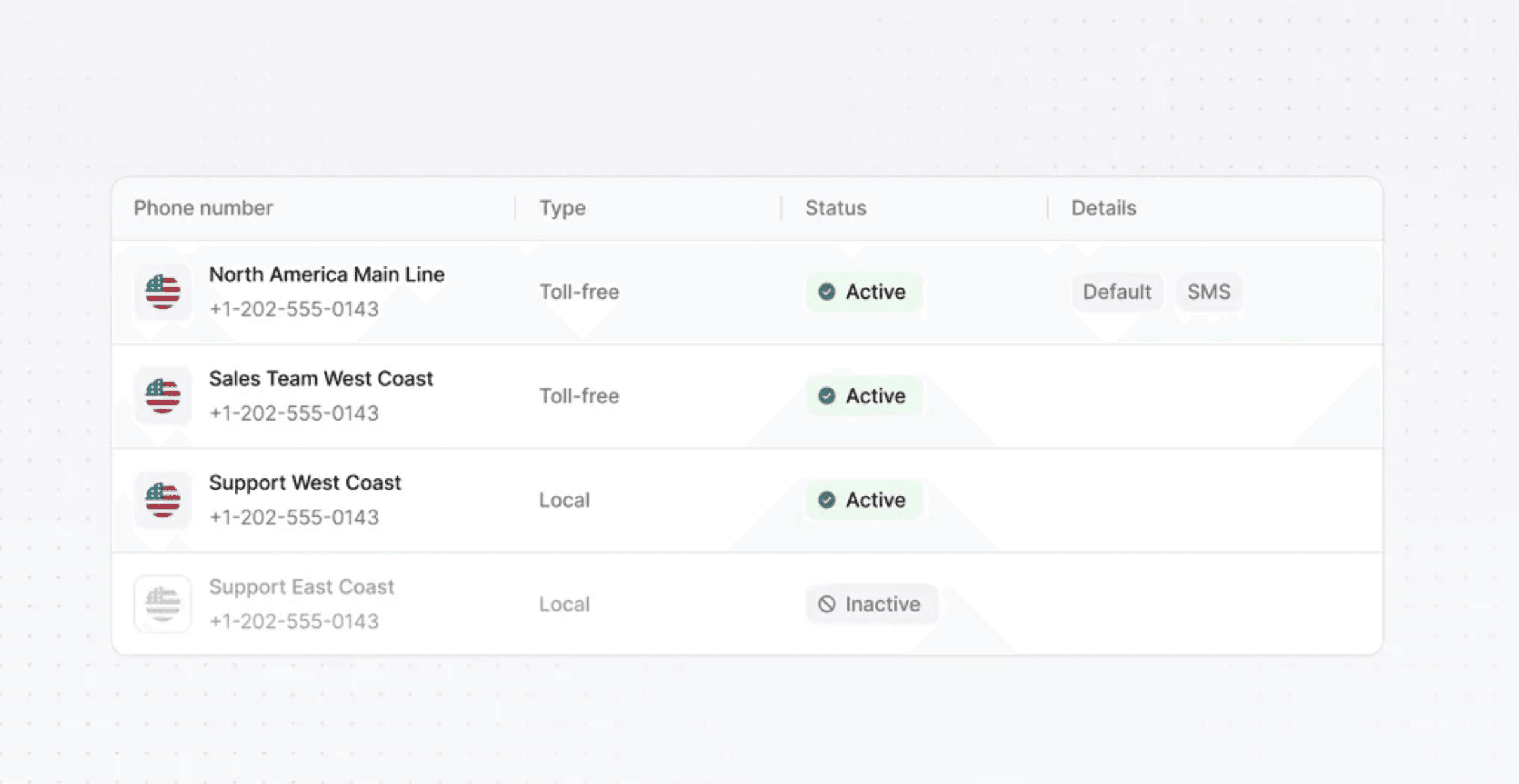
Add several numbers, set a default, and assign numbers per campaign. Spontaneous/outbound calls auto-pick the right number (reuse the last one used with that customer, otherwise the default). You can also link a phone number to each AI Agent and manage Caller ID name.
Other improvements
Gorgias Integration : Automatically create tickets for SMS and Connected calls
Kustomer Integration : Automatically create tickets for SMS and Connected calls
Interface & notifications: Browser alerts for inbound calls, “Missed”, “Voicemail”, “SMS ” filters, Read all, open-conversation badge.
Shopify Metafields : Consio now stores a last_connected_at customer metafield so you can segment by recent conversations.
Customer context for AI Voice Agent
The AI now has full Shopify customer context, including order and shipping and is able to solve full inquiries on it's own. It behaves like a true teammate. The AI agent appears as the agent who took the call and leaves a complete trail in the Inbox. This gives you better visibility into AI-handled calls. Also, you can now run multiple specialized AI agents, for example, one for support and one for sales.
Send and receive SMS in Consio
Send and receive SMS right in Consio. Messages appear in the customer timeline and the Inbox, with clear Sent/Delivered states and friendly error handling.
You can use Consio to track all revenue attributed to SMS handled by agents.
Enable SMS → Settings → Trust Center → Register your numbers for SMS
Multiple phone numbers & smarter routing
Add several numbers, set a default, and assign numbers per campaign. Spontaneous/outbound calls auto-pick the right number (reuse the last one used with that customer, otherwise the default). You can also link a phone number to each AI Agent and manage Caller ID name.
Other improvements
Gorgias Integration : Automatically create tickets for SMS and Connected calls
Kustomer Integration : Automatically create tickets for SMS and Connected calls
Interface & notifications: Browser alerts for inbound calls, “Missed”, “Voicemail”, “SMS ” filters, Read all, open-conversation badge.
Shopify Metafields : Consio now stores a last_connected_at customer metafield so you can segment by recent conversations.
Customer context for AI Voice Agent
The AI now has full Shopify customer context, including order and shipping and is able to solve full inquiries on it's own. It behaves like a true teammate. The AI agent appears as the agent who took the call and leaves a complete trail in the Inbox. This gives you better visibility into AI-handled calls. Also, you can now run multiple specialized AI agents, for example, one for support and one for sales.
Send and receive SMS in Consio
Send and receive SMS right in Consio. Messages appear in the customer timeline and the Inbox, with clear Sent/Delivered states and friendly error handling.
You can use Consio to track all revenue attributed to SMS handled by agents.
Enable SMS → Settings → Trust Center → Register your numbers for SMS
Multiple phone numbers & smarter routing
Add several numbers, set a default, and assign numbers per campaign. Spontaneous/outbound calls auto-pick the right number (reuse the last one used with that customer, otherwise the default). You can also link a phone number to each AI Agent and manage Caller ID name.
Other improvements
Gorgias Integration : Automatically create tickets for SMS and Connected calls
Kustomer Integration : Automatically create tickets for SMS and Connected calls
Interface & notifications: Browser alerts for inbound calls, “Missed”, “Voicemail”, “SMS ” filters, Read all, open-conversation badge.
Shopify Metafields : Consio now stores a last_connected_at customer metafield so you can segment by recent conversations.
Customer context for AI Voice Agent
The AI now has full Shopify customer context, including order and shipping and is able to solve full inquiries on it's own. It behaves like a true teammate. The AI agent appears as the agent who took the call and leaves a complete trail in the Inbox. This gives you better visibility into AI-handled calls. Also, you can now run multiple specialized AI agents, for example, one for support and one for sales.
Send and receive SMS in Consio
Send and receive SMS right in Consio. Messages appear in the customer timeline and the Inbox, with clear Sent/Delivered states and friendly error handling.
You can use Consio to track all revenue attributed to SMS handled by agents.
Enable SMS → Settings → Trust Center → Register your numbers for SMS
Multiple phone numbers & smarter routing
Add several numbers, set a default, and assign numbers per campaign. Spontaneous/outbound calls auto-pick the right number (reuse the last one used with that customer, otherwise the default). You can also link a phone number to each AI Agent and manage Caller ID name.
Other improvements
Gorgias Integration : Automatically create tickets for SMS and Connected calls
Kustomer Integration : Automatically create tickets for SMS and Connected calls
Interface & notifications: Browser alerts for inbound calls, “Missed”, “Voicemail”, “SMS ” filters, Read all, open-conversation badge.
Shopify Metafields : Consio now stores a last_connected_at customer metafield so you can segment by recent conversations.
We've got great news to share: Consio is now integrated with Kustomer.
The goal of this integration is simple: bring your calls into Kustomer conversations, where your team already works, to save time and keep full context across every customer interaction.
What you're getting, starting today
Automatic conversation creation: every completed call in Consio creates a Kustomer conversation (inbound or outbound)
Conversation updates:
when the customer is identified/linked in Kustomer,
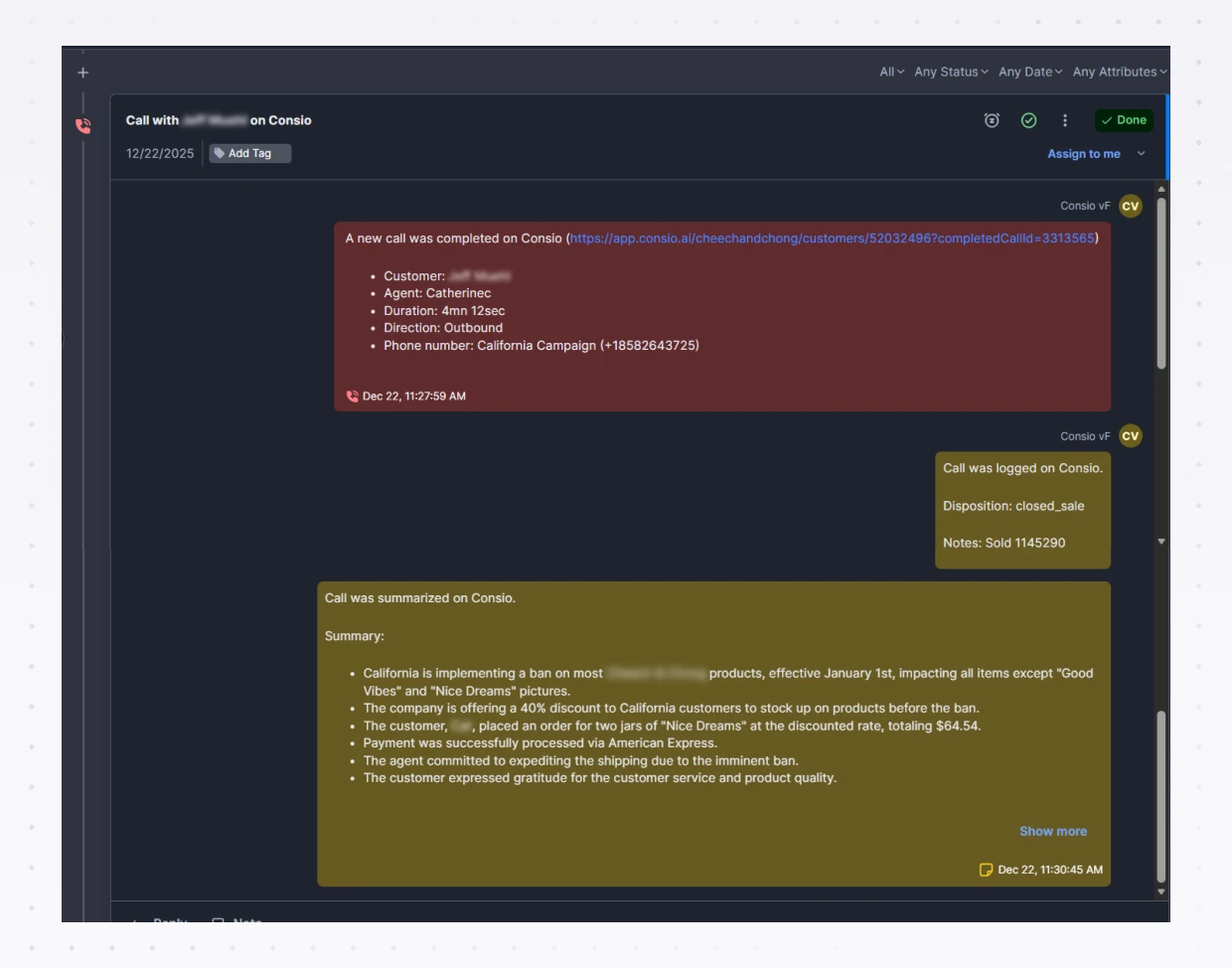
when the call’s AI summary is generated (posted as a message: “Call was summarized on Consio.”),
when the call is logged (posted as a message: “Call was logged on Consio.” with disposition + notes),
the call details are posted as a message: “A new call was completed on Consio” (customer, agent, duration, direction, phone number).
Kustomer → Consio link: open the full call record in Consio in one click if you need to dig deeper.
Why it’s useful
Everything in one place: calls now live in Kustomer alongside your other customer conversations, so agents stay in one workspace.
Less friction: your team sees the same call context (details + disposition/notes + AI summary) directly in the conversation thread.
More action: with the AI summary in Kustomer, you know what to do next without re-listening to the call.
We've got great news to share: Consio is now integrated with Kustomer.
The goal of this integration is simple: bring your calls into Kustomer conversations, where your team already works, to save time and keep full context across every customer interaction.
What you're getting, starting today
Automatic conversation creation: every completed call in Consio creates a Kustomer conversation (inbound or outbound)
Conversation updates:
when the customer is identified/linked in Kustomer,
when the call’s AI summary is generated (posted as a message: “Call was summarized on Consio.”),
when the call is logged (posted as a message: “Call was logged on Consio.” with disposition + notes),
the call details are posted as a message: “A new call was completed on Consio” (customer, agent, duration, direction, phone number).
Kustomer → Consio link: open the full call record in Consio in one click if you need to dig deeper.
Why it’s useful
Everything in one place: calls now live in Kustomer alongside your other customer conversations, so agents stay in one workspace.
Less friction: your team sees the same call context (details + disposition/notes + AI summary) directly in the conversation thread.
More action: with the AI summary in Kustomer, you know what to do next without re-listening to the call.
We've got great news to share: Consio is now integrated with Kustomer.
The goal of this integration is simple: bring your calls into Kustomer conversations, where your team already works, to save time and keep full context across every customer interaction.
What you're getting, starting today
Automatic conversation creation: every completed call in Consio creates a Kustomer conversation (inbound or outbound)
Conversation updates:
when the customer is identified/linked in Kustomer,
when the call’s AI summary is generated (posted as a message: “Call was summarized on Consio.”),
when the call is logged (posted as a message: “Call was logged on Consio.” with disposition + notes),
the call details are posted as a message: “A new call was completed on Consio” (customer, agent, duration, direction, phone number).
Kustomer → Consio link: open the full call record in Consio in one click if you need to dig deeper.
Why it’s useful
Everything in one place: calls now live in Kustomer alongside your other customer conversations, so agents stay in one workspace.
Less friction: your team sees the same call context (details + disposition/notes + AI summary) directly in the conversation thread.
More action: with the AI summary in Kustomer, you know what to do next without re-listening to the call.
We've got great news to share: Consio is now integrated with Kustomer.
The goal of this integration is simple: bring your calls into Kustomer conversations, where your team already works, to save time and keep full context across every customer interaction.
What you're getting, starting today
Automatic conversation creation: every completed call in Consio creates a Kustomer conversation (inbound or outbound)
Conversation updates:
when the customer is identified/linked in Kustomer,
when the call’s AI summary is generated (posted as a message: “Call was summarized on Consio.”),
when the call is logged (posted as a message: “Call was logged on Consio.” with disposition + notes),
the call details are posted as a message: “A new call was completed on Consio” (customer, agent, duration, direction, phone number).
Kustomer → Consio link: open the full call record in Consio in one click if you need to dig deeper.
Why it’s useful
Everything in one place: calls now live in Kustomer alongside your other customer conversations, so agents stay in one workspace.
Less friction: your team sees the same call context (details + disposition/notes + AI summary) directly in the conversation thread.
More action: with the AI summary in Kustomer, you know what to do next without re-listening to the call.
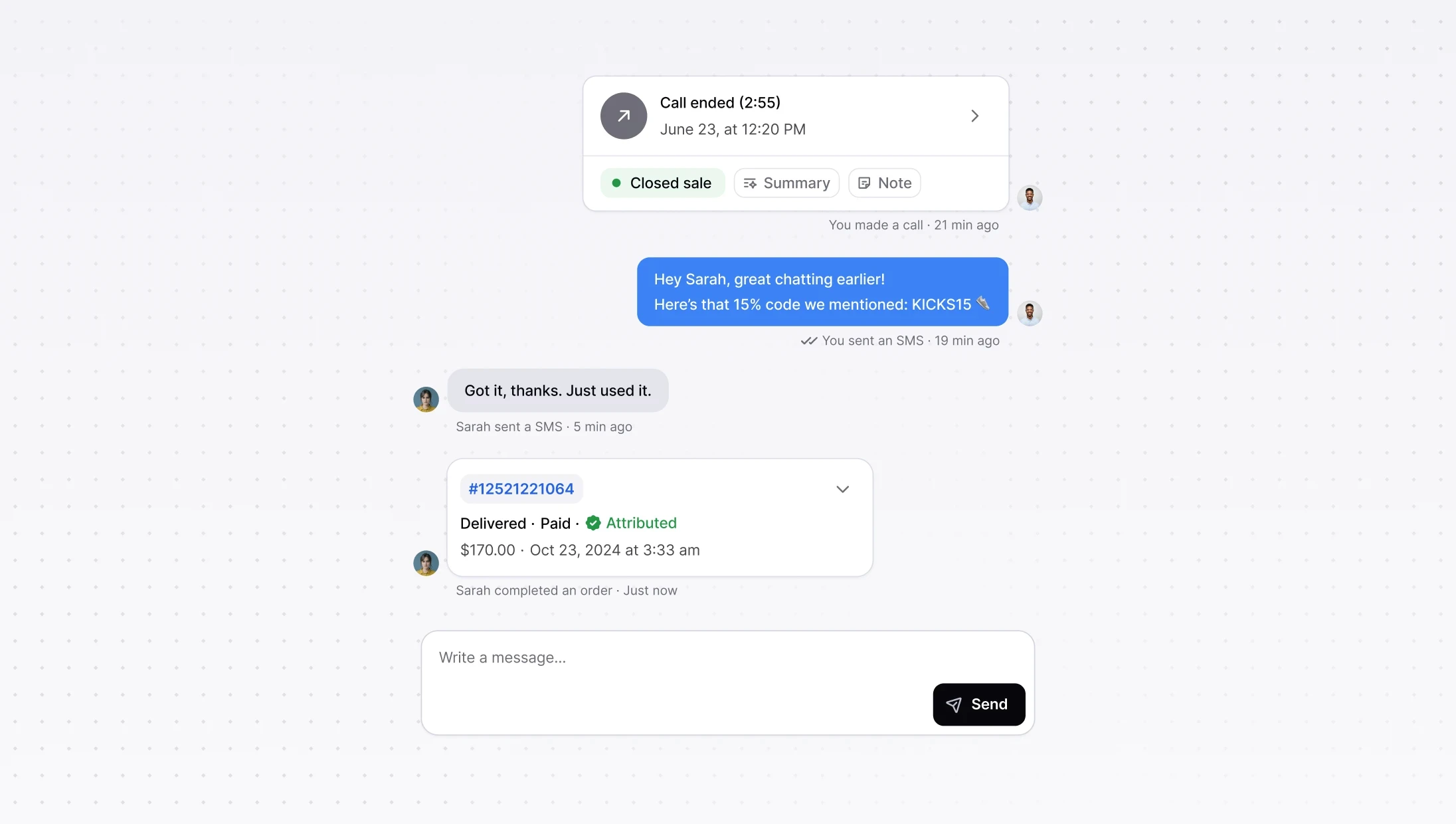
SMS now lives inside Consio so calls, AI, and messages stay in one place. Your team can follow up after missed calls without keeping customers on the line, speed up conversion with quick links, and work faster with a unified timeline and inbox that show clear send and delivery statuses.
Why it matters
Native async support: reply after missed calls without playing phone tag.
Conversion lift: fast follow-ups with payment links, stock info, promo codes.
Productivity: one workspace with tracked messages and clear statuses.
What you can do today
Send 1-to-1 SMS from the dialer, the timeline, or the inbox.
Receive inbound SMS and keep the conversation going in the app.
See every message on the customer timeline with delivery status, and delete if needed.
Need help setting this up?
Check out our guide Getting started with SMS in Consio (US/CA toll-free).
SMS now lives inside Consio so calls, AI, and messages stay in one place. Your team can follow up after missed calls without keeping customers on the line, speed up conversion with quick links, and work faster with a unified timeline and inbox that show clear send and delivery statuses.
Why it matters
Native async support: reply after missed calls without playing phone tag.
Conversion lift: fast follow-ups with payment links, stock info, promo codes.
Productivity: one workspace with tracked messages and clear statuses.
What you can do today
Send 1-to-1 SMS from the dialer, the timeline, or the inbox.
Receive inbound SMS and keep the conversation going in the app.
See every message on the customer timeline with delivery status, and delete if needed.
Need help setting this up?
Check out our guide Getting started with SMS in Consio (US/CA toll-free).
SMS now lives inside Consio so calls, AI, and messages stay in one place. Your team can follow up after missed calls without keeping customers on the line, speed up conversion with quick links, and work faster with a unified timeline and inbox that show clear send and delivery statuses.
Why it matters
Native async support: reply after missed calls without playing phone tag.
Conversion lift: fast follow-ups with payment links, stock info, promo codes.
Productivity: one workspace with tracked messages and clear statuses.
What you can do today
Send 1-to-1 SMS from the dialer, the timeline, or the inbox.
Receive inbound SMS and keep the conversation going in the app.
See every message on the customer timeline with delivery status, and delete if needed.
Need help setting this up?
Check out our guide Getting started with SMS in Consio (US/CA toll-free).
SMS now lives inside Consio so calls, AI, and messages stay in one place. Your team can follow up after missed calls without keeping customers on the line, speed up conversion with quick links, and work faster with a unified timeline and inbox that show clear send and delivery statuses.
Why it matters
Native async support: reply after missed calls without playing phone tag.
Conversion lift: fast follow-ups with payment links, stock info, promo codes.
Productivity: one workspace with tracked messages and clear statuses.
What you can do today
Send 1-to-1 SMS from the dialer, the timeline, or the inbox.
Receive inbound SMS and keep the conversation going in the app.
See every message on the customer timeline with delivery status, and delete if needed.
Need help setting this up?
Check out our guide Getting started with SMS in Consio (US/CA toll-free).